Elective subject of 2nd year of ESO that develops the specific skills CE2, CE3 and CE4: digital security and well-being, communication and dissemination of ideas, and creation and editing of digital content. We work from the blocks of knowledge "Editing and creation of contents", "Communication and diffusion of ideas" and "Critical digital citizenship and security". The specific competences are shared between Digital Resources I (CE2, CE3 and CE4; 2nd ESO) and Digital Resources II (CE1 and CE5; 3rd ESO). Where MS Office or Google applications are named, the reference is to office applications in general, including LibreOffice, EuroOffice and protonmail's cloud applications.
Key Competences
Competence in linguistic communication
It involves interacting coherently in different settings, whether orally, in writing or through multiple modes, mobilising knowledge to understand, interpret and produce messages critically and effectively.
Competence in mathematics and in science, technology and engineering
It involves using mathematical and scientific thinking to solve problems, together with technological and engineering methods to transform the environment responsibly and sustainably.
Digital competence
It involves the safe, healthy, sustainable, critical and responsible use of digital technologies for learning, work and social participation, including computational thinking and programming.
Personal, social and learning-to-learn competence
It is the ability to reflect on oneself, self-manage, collaborate with others, remain resilient and manage learning throughout life, coping with uncertainty and complexity.
Citizenship competence
It is the ability to exercise responsible citizenship and take part in social and civic life, based on an understanding of social, economic and political concepts and on a commitment to sustainability and human rights.
Entrepreneurial competence
It involves identifying needs and opportunities and turning ideas into solutions and projects that create value (social, cultural or economic), developing creativity, initiative and planning.
Competence in cultural awareness and expression
It involves understanding and respecting how ideas and emotions are expressed creatively in different cultures and art forms, and developing the expression of one's own ideas in a diverse world.
Operational Descriptors
CC1
Analyses and understands ideas about the social and civic dimension of their own identity, as well as the cultural, historical and normative facts that determine it, showing respect for rules, empathy, fairness and a constructive spirit when interacting with others in any context.
CC2
Analyses and takes on, on a well-founded basis, the principles and values that stem from the European integration process, the Spanish Constitution and human and children's rights, taking part in community activities, such as decision-making or conflict resolution, with a democratic attitude, respect for diversity, and a commitment to gender equality, social cohesion, sustainable development and the achievement of global citizenship.
CC3
Understands and analyses fundamental and current ethical problems, critically considering their own and other people's values, and developing their own judgements in order to face moral controversy with a dialoguing, argumentative and respectful attitude, opposed to any kind of discrimination or violence.
CC4
Understands the systemic relationships of interdependence, eco-dependence and interconnection between local and global actions, and consciously and willingly adopts a sustainable, ecologically and socially responsible lifestyle.
CCEC2
Enjoy, recognize and independently analyze the specificities and intentions of the most outstanding artistic and cultural manifestations of the heritage, distinguishing the media and supports, as well as the languages and technical elements that characterize them.
CCEC3
He expresses ideas, opinions, feelings and emotions through cultural and artistic productions, integrating his own body and developing self-esteem, creativity and a sense of the place he occupies in society, with an empathic, open and collaborative attitude.
CCEC4
Knows, selects and creatively uses various media and supports, as well as plastic, visual, audiovisual, sound or body techniques, for the creation of artistic and cultural products, both individually and collaboratively, identifying opportunities for personal, social and work development, as well as entrepreneurship.
CCL1
Expresses themselves orally, in writing, by signing or multimodally with coherence, correctness and appropriateness to different social contexts, and takes part in communicative interactions with a cooperative and respectful attitude both to exchange information, create knowledge and convey opinions, and to build personal bonds.
CCL2
Understands, interprets and evaluates with a critical attitude oral, written, signed or multimodal texts from the personal, social, educational and professional fields in order to take part in different contexts in an active and informed way and to build knowledge.
CCL3
Locates, selects and contrasts information from different sources in a progressively autonomous way, evaluating its reliability and relevance according to the reading goals and avoiding the risks of manipulation and disinformation, and integrates and transforms it into knowledge in order to communicate it, adopting a creative, critical and personal point of view that is at the same time respectful of intellectual property.
CCL5
It puts its communicative practices at the service of democratic coexistence, the dialogic resolution of conflicts and the equal rights of all people, avoiding discriminatory uses, as well as abuses of power, to promote the not only effective but also ethical use of the different communication systems.
CD1
Searches the internet according to criteria of validity, quality, currency and reliability, selecting the results critically and archiving them in order to retrieve, reference and reuse them, respecting intellectual property.
CD2
Manages and uses their own personal digital learning environment to build new knowledge and create digital content, through information-processing strategies and the use of different digital tools, selecting and configuring the most appropriate one depending on the task and on their lifelong learning needs.
CD3
Communicates, participates, collaborates and interacts by sharing knowledge, data and information through virtual tools and platforms, manages their actions, presence and visibility online responsibly, and exercises an active, civic and reflective digital citizenship.
CD4
Identifies risks and adopts preventive measures when using digital technologies in order to protect devices, personal data, health and the environment, and to become aware of the importance and need for a critical, legal, safe, healthy and sustainable use of these technologies.
CD5
Develops simple computer applications and creative, sustainable technological solutions to solve specific problems or respond to proposed challenges, and shows interest and curiosity about the evolution of digital technologies and about their sustainable development and ethical use.
CE1
Analyses and assesses challenges and opportunities in the immediate and global environment, and presents innovative and sustainable ideas and solutions, applying the principles of project management and design thinking, to create value for others.
CE2
Mobilises personal, social and cultural resources, including financial ones, to carry out ideas and projects, and to make ethical and responsible economic and financial decisions, considering the social and environmental impact.
CE3
Develops the personal qualities needed for entrepreneurship, such as creativity, perseverance, self-confidence and a critical spirit.
CPSAA1
Regulates and expresses their emotions, strengthening optimism, resilience, self-efficacy and the search for purpose and motivation towards learning, in order to manage challenges and changes and harmonise them with their own goals.
CPSAA2
Understands the health risks related to social factors, consolidates healthy lifestyles from both a physical and a mental point of view, recognises behaviours that are contrary to coexistence and applies strategies to deal with them.
CPSAA4
Carries out self-assessments of their learning process, looking for reliable sources to validate, support and contrast information and to obtain relevant conclusions.
CPSAA5
Plans short- and medium-term goals, using self-assessment strategies to improve and persist in learning.
STEM1
Uses inductive and deductive methods typical of mathematical reasoning in familiar situations, selects and applies different strategies to solve problems, critically analyses the solutions and reformulates the procedure, if necessary.
STEM2
Uses scientific thinking to understand and explain the phenomena that occur around them, trusts in knowledge as an engine of development, asks questions and checks hypotheses through experimentation and enquiry, uses suitable tools and instruments, appreciates the importance of precision and truthfulness and shows a critical attitude about the scope and the limitations of science.
STEM3
Plans and develops projects; designs, manufactures and evaluates different prototypes or models in order to generate and use products that provide a solution to a need or problem creatively and as a team; ensures that the whole group takes part; resolves peacefully any conflicts that may arise; adapts to uncertainty, and values the importance of sustainability.
STEM4
Interprets and transmits scientific information in different formats, using precise language and mathematical and scientific tools.
STEM5
Puts healthy lifestyle habits into practice, becoming aware of the importance of health and sustainability for the preservation of the environment.
Specific Competences
2. Digital safety and health
Assess and anticipate risks to the health and safety of devices and personal data, identifying the main threats in order to use them safely, healthily and legally.
3. Communication and online presence
Express, communicate and disseminate ideas and content with an inclusive and non-sexist language, using simple communication and publication tools to responsibly manage your online presence.
4. Creating and editing digital content
To use the computer tools available to create and edit digital content of different nature, working independently or collaboratively, to apply them to the construction of knowledge and to support learning in various areas.
Assessment Criteria
Criterion 2.1
Protect personal data and the digital footprint generated on the internet by configuring the privacy conditions of social networks and virtual work spaces.
- Protect personal data with the configuration of privacy conditions in social networks and virtual workspaces.
- Manage the digital footprint by adjusting privacy options in digital environments.
Criterion 2.2
Configure and update passwords, operating systems and antivirus periodically on the various digital devices in regular use.
- Set up secure passwords for each device and digital account.
- Periodically update passwords to keep devices secure.
- Keep operating systems up to date to protect devices against vulnerabilities.
- Install and update antivirus, performing periodic scans to identify threats.
Criterion 2.3
Identify and know how to react to situations that represent a threat to the network by choosing the best solution among several options and valuing personal and collective well-being.
- Identify dangerous situations on the network.
- Respond to a risk on the Internet by choosing the best option.
- Ensure well-being and safety on the network.
Criterion 3.1
Interact in virtual communication spaces and collaborative learning platforms, adapting to different audiences with a participatory and respectful attitude.
- Use collaborative virtual learning environments.
- Use the tag in email, newsgroups, web plans...
- Participate in virtual spaces of communication respectfully and correctly.
Criterion 3.2
Share and publish information and data on the network, making use of the different tools and formats available on the internet.
- Use applications and online platforms to share data and content effectively.
- Select and apply suitable digital formats for the publication of content depending on the context and the audience.
Criterion 4.1
Create and edit digital content individually or collectively, selecting the most appropriate tools creatively.
- Create and edit digital content creatively individually or collectively.
- Select the most appropriate tools for creating and editing content.
Criterion 4.2
To use own software from various fields independently, taking advantage of the advantages provided by these tools to deepen the knowledge of the different subjects.
- Use the software independently.
- Take advantage of the specific functionalities of each software to expand and deepen knowledge and skills in different subjects.
Timing
2026-27 school year calendar
This is an optional subject organised in three blocks over the school year. These are the dates of the official school calendar of the Balearic Islands, which show when each block is taught and when the evaluations take place.
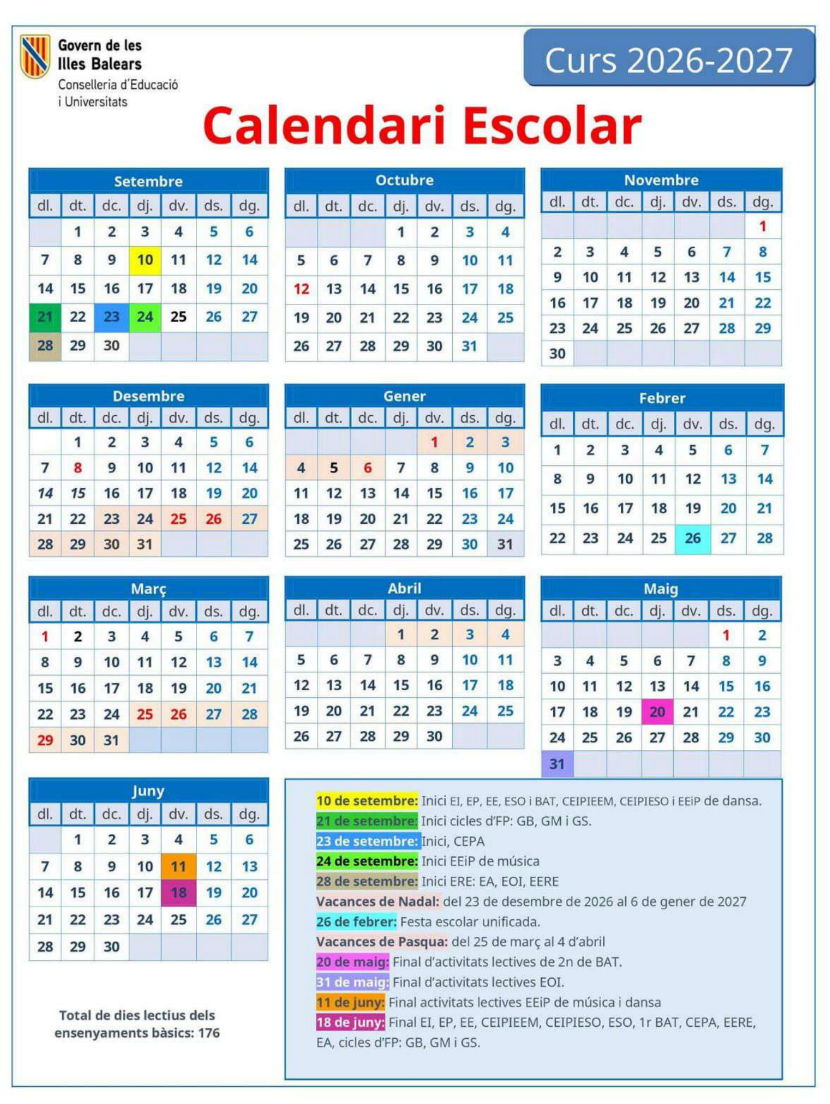
Optional subject: 3 blocks throughout the course
This schedule is indicative and flexible: it adapts to the pace of the group and to the timetable of the optional subject, and makes room for extension or reinforcement activities as needed.
Methodology, attention to diversity and assessmentAll the teaching units share the same approach, whether one alternative or the other is done.
- Methodology: project-based learning (PBL) with a final product, active methodologies, cooperative work, self-assessment and peer assessment.
- Attention to individual needs: adapting tasks to the skills of each student and individual supervision during the sessions.
- Assessment: direct observation in class and grading of the tasks and of the final product.
UP1: Typing (optional task to raise the grade)
(5-8 divided sessions. Optional: raises the grade by half a point if the previous course was not taught to most students)
We learn to type with all fingers without looking at the keyboard, improving speed and accuracy.
See the challenges and resources
- Challenge 1: Learn to use all your fingers without looking at the keyboard.
- Challenge 2: Type each key with the corresponding finger.
- Challenge 3: Type fluently without mistakes.
- Challenge 4: Accuracy: keep the percentage of errors below 4%.
- Main platform: Cursomeca (cursomeca.com) with 27 guided lessons. Alternative in Catalan: MecaGratis (mecagratis.com).
- Other resources: TypingClub, Ratatype, Velocidactil, Artypist.
- Free applications for Linux: TuxTyping and KTouch.
Pedagogical justification
Touch typing develops muscle memory and hand-eye coordination, and makes it easier to take notes, write reports and sit online exams. Despite the advance of AI and voice recognition, writing quickly and without errors remains a basic professional competence that frees up cognitive load for higher-level tasks.
UP2 · How to be responsible in the digital age?
(10 sessions)
The specific competence CE2 is worked on: identifying risks and threats, configuring privacy and passwords, protecting personal data and digital footprint, and recognising situations of violence and fraud online. Responsible citizenship and security. Criteria: CA 2.1, CA 2.2 and CA 2.3.
Hacking concept map
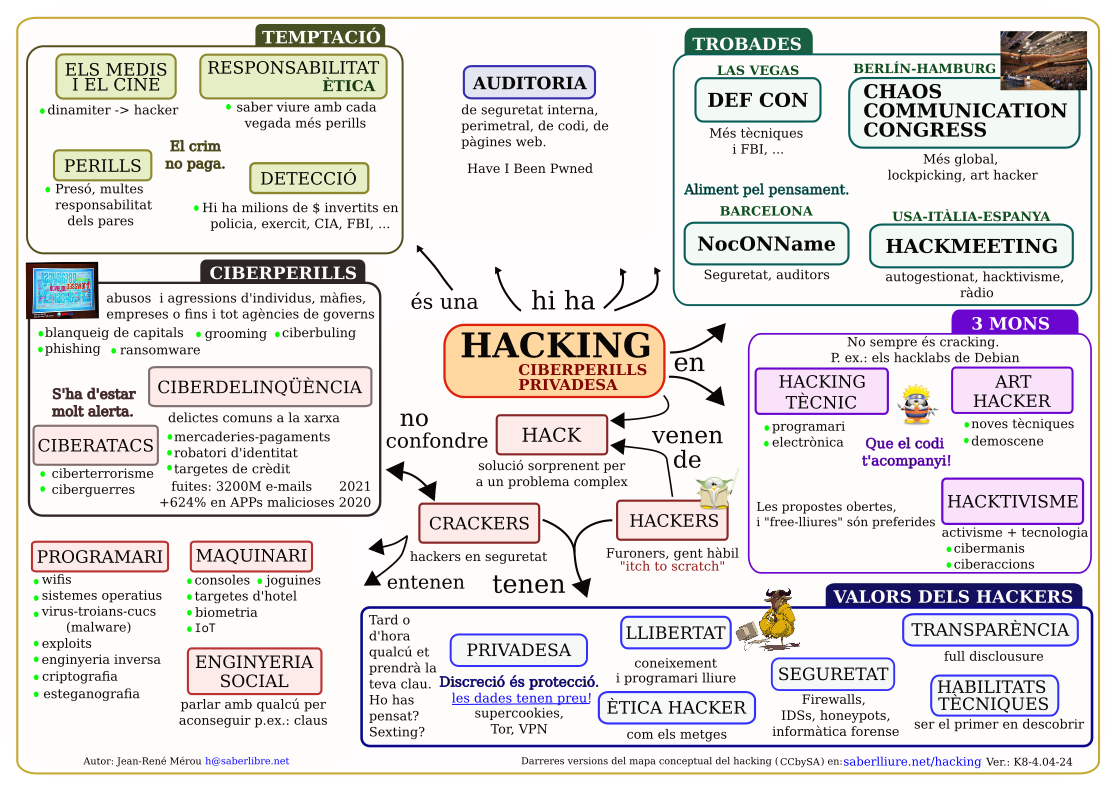
Click the image to see the map in full size.
UP3: Who am I on the web? (My digital footprint)
(12 sessions · alternative to B: choose one of the two)
We discover what information about us exists on the internet and how to protect our digital footprint, from researching profiles to a final infographic. Criteria: CA 2.1.
See the sessions
- Session 1: opening activity with Kahoot or Mentimeter about digital habits (the QR code is used from the mobile phone). Activity “What does the internet know about me?”: each student searches for their name, or that of a fictional character, on Google and comments on the result. It closes with a brainstorm: what is a digital footprint?
- Session 2: “Digital detectives” activity: each group receives a printed or projected profile and must say what information can be found, what risks there are and what advice they would give. Group discussion and a collective list of good practices.
- Session 3: “What do I leave behind when I post?”: real cases of problems caused by posts, a checklist to review before posting and a written reflection.
- Session 4: “The future recruiter”: role play in pairs. The recruiter reviews a fictional profile with mistakes (compromising photos, locations, personal data), interviews the candidate and decides whether they would hire them.
- Sessions 5-6: introduction to Canva with a demo by the teacher and a paper draft with the key ideas.
- Sessions 7-10: creating the infographic.
- Sessions 11-12: individual presentation of the infographic in class.
Final product: infographic “10 tips to look after my digital footprint”.
Materials: theory and videos on the digital footprint, examples of real cases, role-play material (profiles and grid), Canva, a computer with internet connection and a Google Workspace for Education account.
UP4 · Am I safe in the digital world? (cybersecurity)
(12 sessions · alternative to A: choose one of the two)
We create strong passwords, keep devices up to date and learn to recognise fraud and cyberattacks, and to know what to do if they happen to us. Criteria: CA 2.2 and CA 2.3.
See the sessions
- Session 1: “Strongest password” game in small groups: each student creates a password and tests it on a strength test. Short debate and a passphrase task based on a saying, song or book.
- Session 2: weak passwords and common mistakes: analysis of lists of common passwords and sorting of cards (weak, medium, strong). Reflection: what happens if you reuse the same password?
- Session 3: devices also need protecting: updating operating systems and apps, antivirus and periodic scans.
- Session 4: digital dangers: analysis of fraudulent messages (phishing, SMS, emails) and the exercise “Spot the trap”.
- Session 5: types of cyberattacks (malware, ransomware, phishing, doxxing…) and how to react, with a role play per group and the conclusion “What do I do if it happens to me?”.
- Session 6: security on Wi-Fi networks.
- Sessions 7-10: creating the multimedia presentation on the types of cyberattacks and how to protect ourselves.
- Sessions 11-12: individual presentation in class.
Vocabulary activity: security glossary
On the classroom computers (Ubuntu), open LibreOffice Writer and make a glossary with the terms: virus, Trojan, malware, spyware, ransomware, firewall, antivirus, backup, phishing and SPAM. Then a crossword with the glossary (educima.com).
Final product: multimedia presentation on the types of cyberattacks and how to protect ourselves.
Materials: presentation on strong passwords, printable documents (base and cards), Google Docs, a computer with internet connection and a Google Workspace for Education account.
UP5: Editing and creating content
(10 sessions)
The specific competence CE4 is worked on: creating and editing digital content of different kinds (image, audio, video, 3D and creative formats), individually or collectively and with autonomy. Criteria: CA 4.1 and CA 4.2.
Classroom resources: making a video
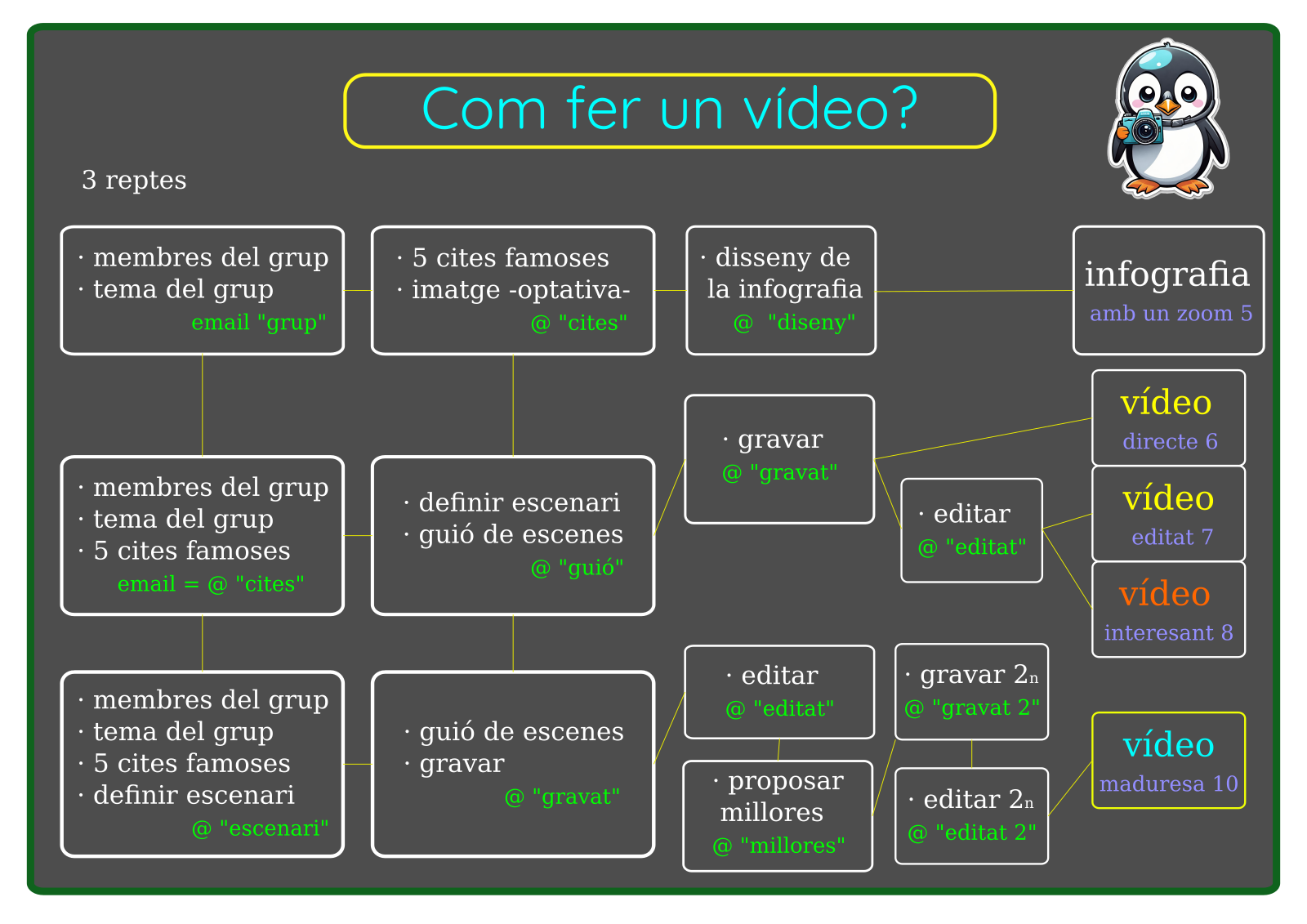
Map “How to make a video?” with the steps and key considerations for planning and creating a video (see the map).
Resource on the Sustainable Development Goals from the SERGI Foundation (fundaciosergi.org).
UP6: How to turn an idea into an image or a video?
(14 sessions · alternative to B: choose one of the two)
We edit images, plan a video with a storyboard, record it with the mobile phone and edit it, and make a promotional poster. Criteria: CA 4.1 and CA 4.2.
See the sessions
- Session 1: opening activity “If an image is worth a thousand words…”: Kahoot with famous logos and posters.
- Sessions 2-4: image editing practice.
- Session 5: licences and copyright (Creative Commons).
- Session 6: storyboard and visual narrative.
- Session 7: video recording with the mobile phone (shots and framing).
- Sessions 8-9: basic video editing.
- Session 10: creating promotional posters.
- Sessions 11-14: group work to develop the video.
Final product: 1-2 minute video and promotional poster.
Classroom resources: AI tools for video
List of free AI tools for video (PDF), the Monica tool (monica.im) and the YouTube video about ChatGPT’s new image generator (watch).
Multi-level scoring of the videos (to work a bit more and raise the grade; example from the 2024-25 course):
See the multi-level scoring
- Major problem: email without a subject → 4.
- Email without a greeting but with content → -1 on the grade.
- I did it, I understood it and applied it (no grade indicated).
- Gets a video → 6.5.
- The video is very good → 7.5.
- Shares the prompt and analyses it (rich, intricate) → 8.5.
- States the AI used, with a link → 9.5.
- Published very well and shows maturity → 10.
UP7: From design to the real world (3D and the Soma cube)
(12 sessions · alternative to A: choose one of the two)
We design objects and spaces in 3D with Tinkercad and SketchUp, prepare them for printing and solve the Soma cube challenge. Criteria: CA 4.1 and CA 4.2.
See the sessions
- Session 1: opening activity “The future is printed”: 3D-printed objects, a short video of real applications (medicine, architecture, art…) and the question “What would you print if you could design anything?”.
- Session 2: introduction to Tinkercad and basic shapes.
- Session 3: creating a keyring or a simple figure.
- Sessions 4-5: the Soma cube challenge: explanation (history and goal) and design of the pieces.
- Session 6: creating a box for the Soma cube.
- Session 7: preparing for 3D printing (STL and slicing).
- Session 8: assembling the Soma cube with the printed pieces and challenges with alternative shapes.
- Sessions 9-10: introduction to SketchUp: navigation and basic tools.
- Sessions 11-12: designing a real space in the school (classroom or yard).
Final product: small 3D-printed object (Soma cube).
Materials: a computer with internet connection, a Google Workspace for Education account, Tinkercad, SketchUp and a 3D printer.
UP8: Communication and dissemination of ideas
(12 sessions)
The specific competence CE3 is worked on: preparing, publishing and disseminating documents and content with inclusive language, interacting in virtual spaces and publishing responsibly on the internet. Criteria: CA 3.1 and CA 3.2.
UP9: My first website: digital portfolio
(10 sessions)
We build a personal website with Google Sites where we bring together the projects of the course. Criteria: CA 3.1 and CA 3.2.
See the sessions
- Session 1: what is a digital portfolio? Introduction to the concept and examples.
- Session 2: introduction to Google Sites.
- Sessions 3-4: designing the structure (home, about me, projects…).
- Sessions 5-7: adding content, such as the final products of the units worked on (infographic, presentation, video…).
- Session 8: review and aesthetic improvement.
- Sessions 9-10: final presentation.
Final product: personal website (digital portfolio) with all the projects of the course.
Materials: a computer with internet connection, a Google Workspace for Education account and Google Sites.
UP10: Your mind against tricks
(3 sessions)
Interactive concept map with the eight traps that can fool our mind (celebrities, rushing, the small print, what everyone says, AI making things up…) and four steps to avoid falling for them: Stop · Ask · Check · Question yourself. Each box has an everyday example and how to protect yourself, and at the end there is a test of situations.
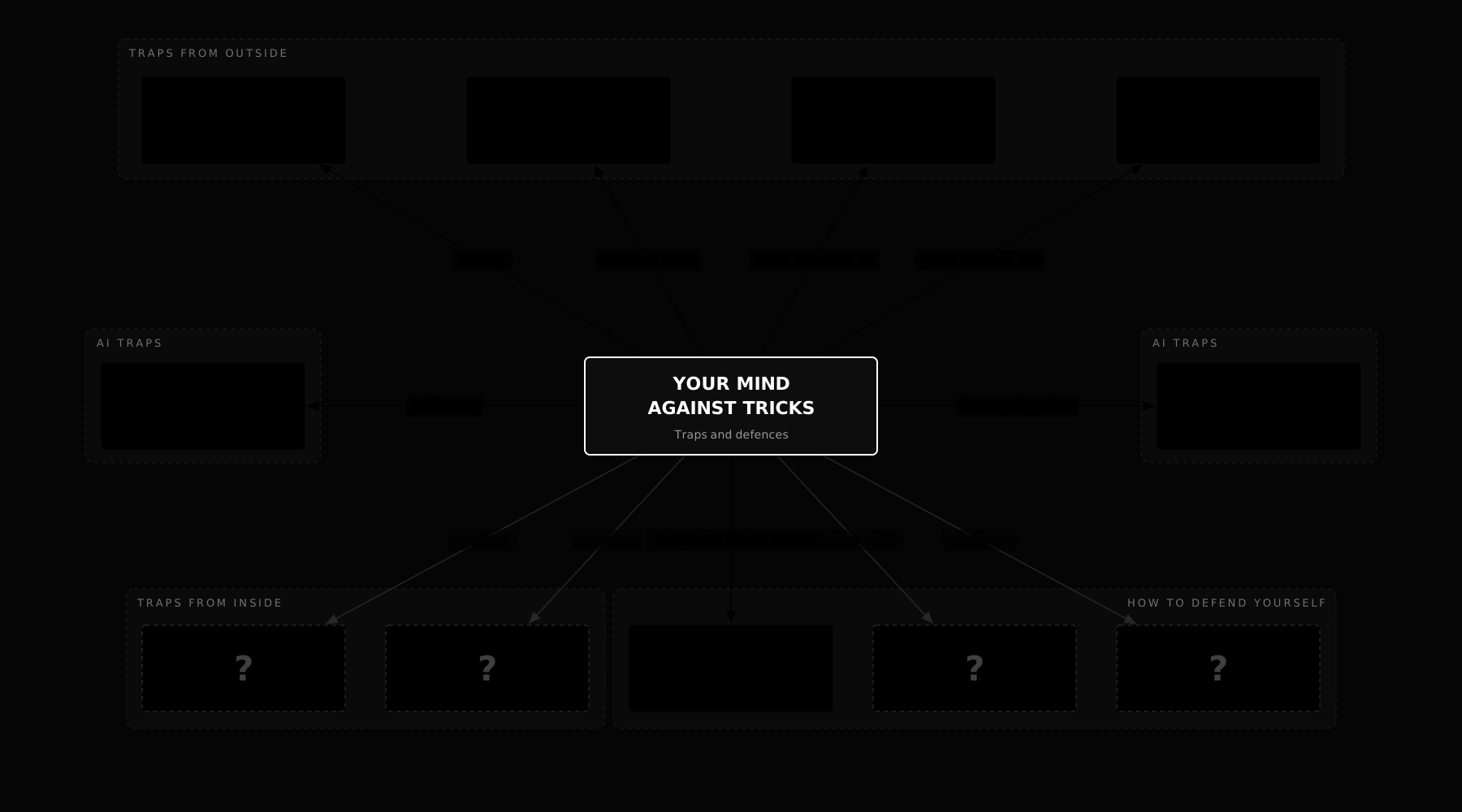
UP11: Can we detect fake news?
(10 sessions)
We learn to look for reliable information, to detect fake news and scams and to make critical use of networks, and then we create a digital awareness campaign. Criteria: CA 2.3.
See the sessions
- Session 1: opening activity “Real news or fake?”: a series of news items is presented and students must guess whether they are real or false.
- Session 2: what is fake news? Nearby examples.
- Session 3: analysis of how fake news is created and spread.
- Session 4: digital verification tools.
- Session 5: workshop on dismantling fake news.
- Sessions 6-8: preparing and creating the digital awareness campaign.
- Session 9: presentation of the campaigns.
- Session 10: reflection and debate on disinformation.
Final product: digital awareness campaign.
Materials: a computer with internet connection and a Google Workspace for Education account.
Basic Knowledge
A. Editing and content creation
- Bitmap images and software such as photo editors.
- Vector images and software to create them.
- Audio and video: capture, edit and export.
- Design of plans and 3D models with computer-aided design (CAD) software.
- Converting designs, blueprints and 3D models into usable instructions for computer-aided manufacturing (CAM).
- Organization of information: conceptual maps and diagrams.
- Specific software for the treatment of basic knowledge of other subjects (graphic calculators, interactive maps, various web applications...).
- Creation of content with creative formats: comics and animations, podcasts, interactive games...
B. Communication and dissemination of ideas
- Elaboration of documents using digital tools with clear and coherent ideas and information.
- Publication of documents through appropriate, accessible and understandable platforms or digital media.
- Dissemination of documents through digital channels with information and effective interaction.
- Communication in the blogosphere and network cooperation.
- Responsible publication and dissemination in networks: basic rules of digital etiquette.
- Publication of content on the web.
C. Critical digital citizenship and security
- Search and selection of reliable information. Tools to detect fake news and fraud. Critical use of networks.
- Security and data protection. Preventive measures (password management, backups).
- Identity, image, reputation and digital footprint.
- Device security: common risks and threats. cyber attacks
- Preventive measures for secure networks and corrective measures in the network.
- Personal health and wellness on the internet. Impact on mental and emotional health in networks.
- Protection of personal and private data. Secure passwords.
- Situations of violence on the networks.
- Main risks on the internet: scams and online shopping, fraud techniques.
- Ethical use of data and digital tools: freedom of expression, digital etiquette.
- Intellectual property and licenses of use.
- Evaluation from an ethical point of view of the use of programmed obsolescence in the digital field.
References and extras
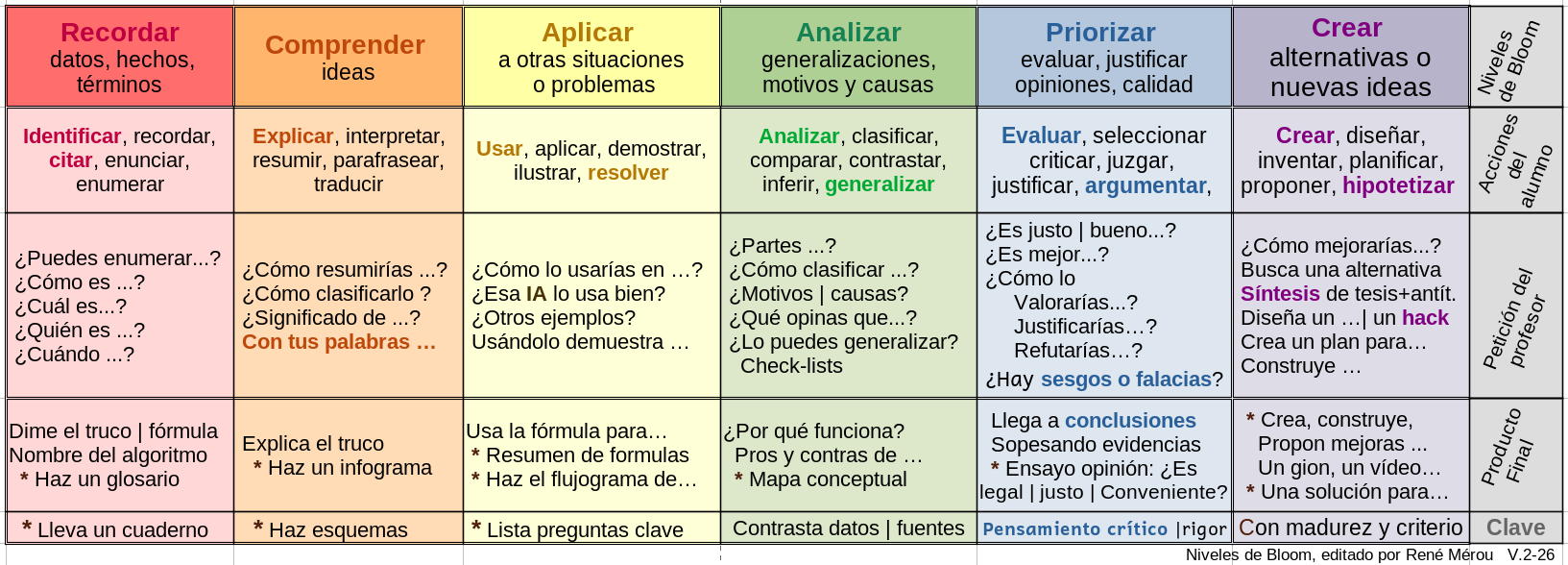
Bloom's Taxonomy Table
A visual guide to learn how to study better. Instead of just memorising, discover how to start by analysing and prioritising information to make your study more effective.
Useful for students and families to understand how we learn and how we are assessed.
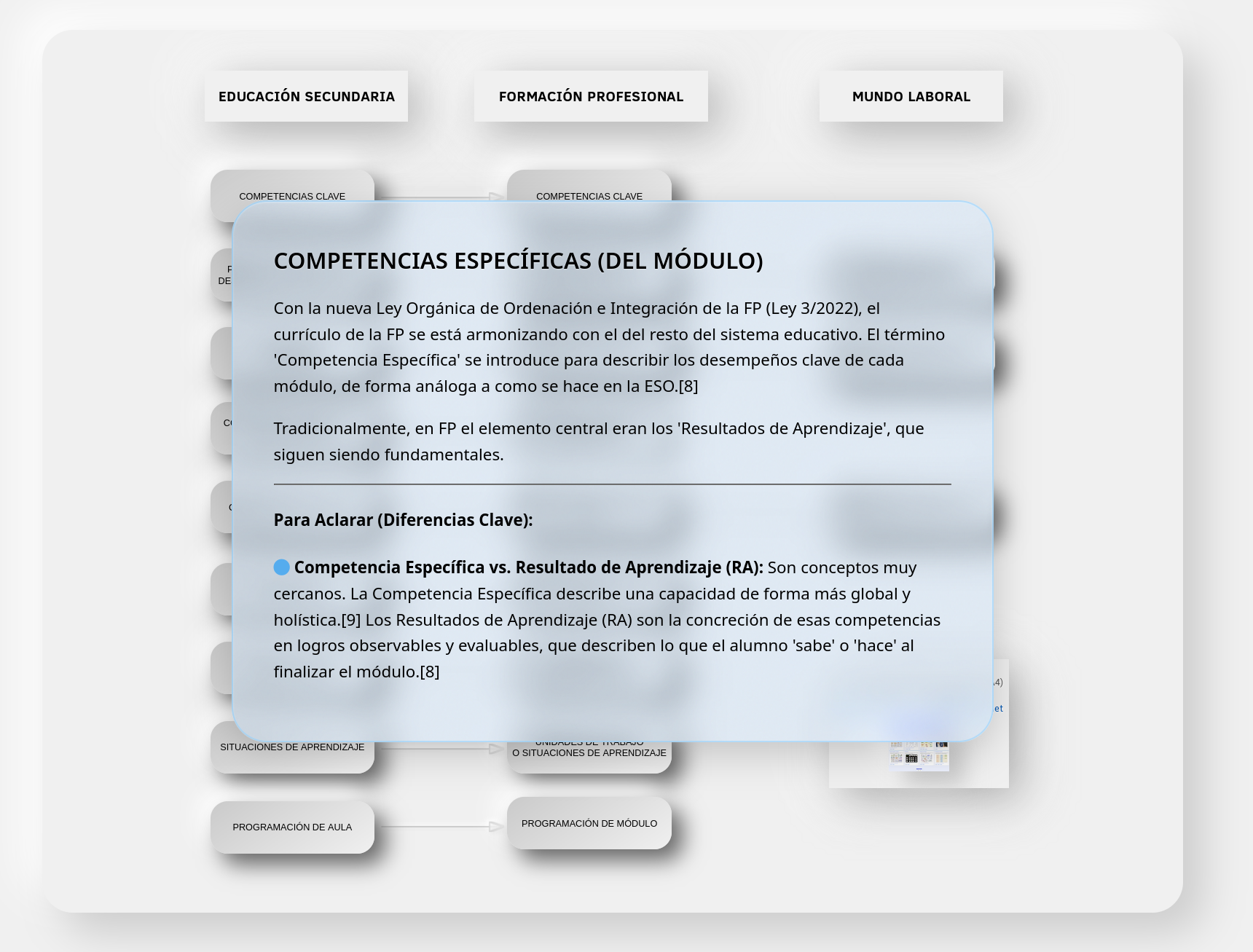
FP and Secondary Education Terminology
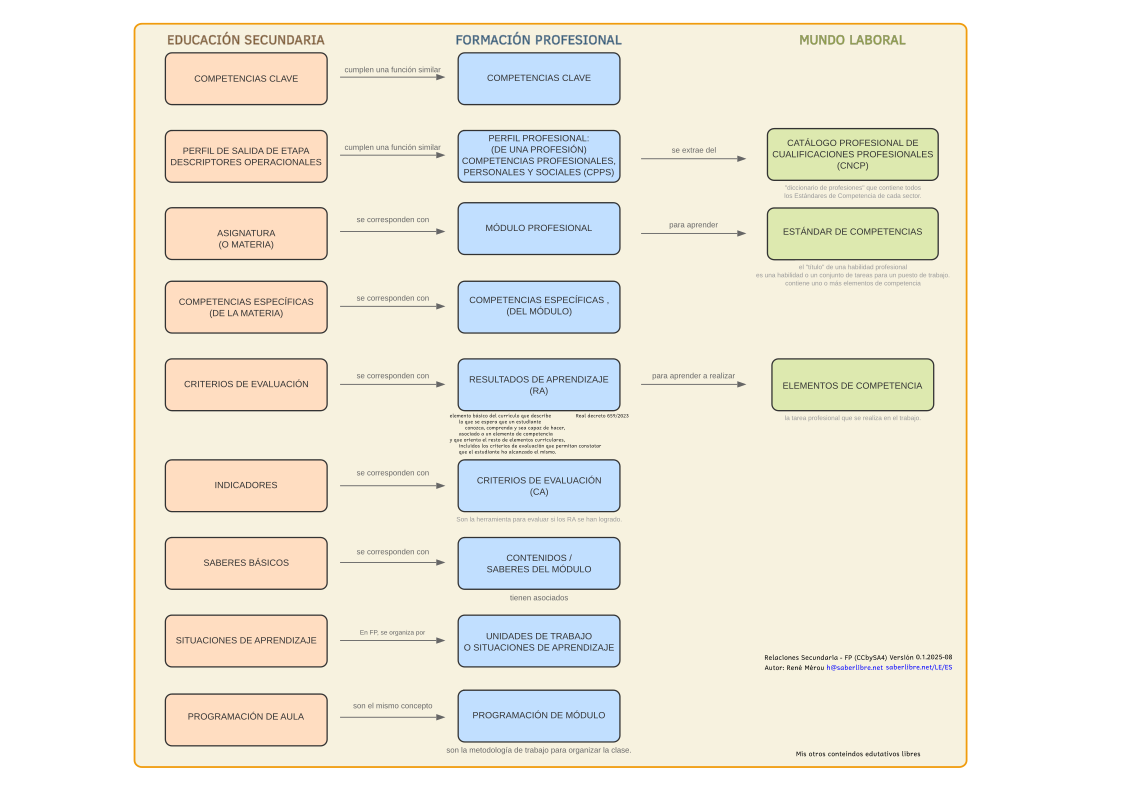
My interactive conceptual hypermap that clarifies and connects the terminology used in Vocational Training (FP) and Secondary Education.
Official curriculum of Digital Resources (Balearic Islands)
Official document of the optional subject Digital Resources, with the specific skills, evaluation criteria and basic knowledge sequenced between RD I (2nd ESO) and RD II (3rd ESO).
Decree 42/2025, of August 1 (ESO in the Balearic Islands)
Rule that establishes the organization and curriculum of Compulsory Secondary Education in the Balearic Islands and that provides the legal framework for this matter.
Teaching and citizen digital competence framework
Reference for operational descriptors (CD1–CD5) that cross the entire subject.
Guidelines and materials from the Educational Planning Service
Templates, sequences and didactic programming models published by the Ministry.