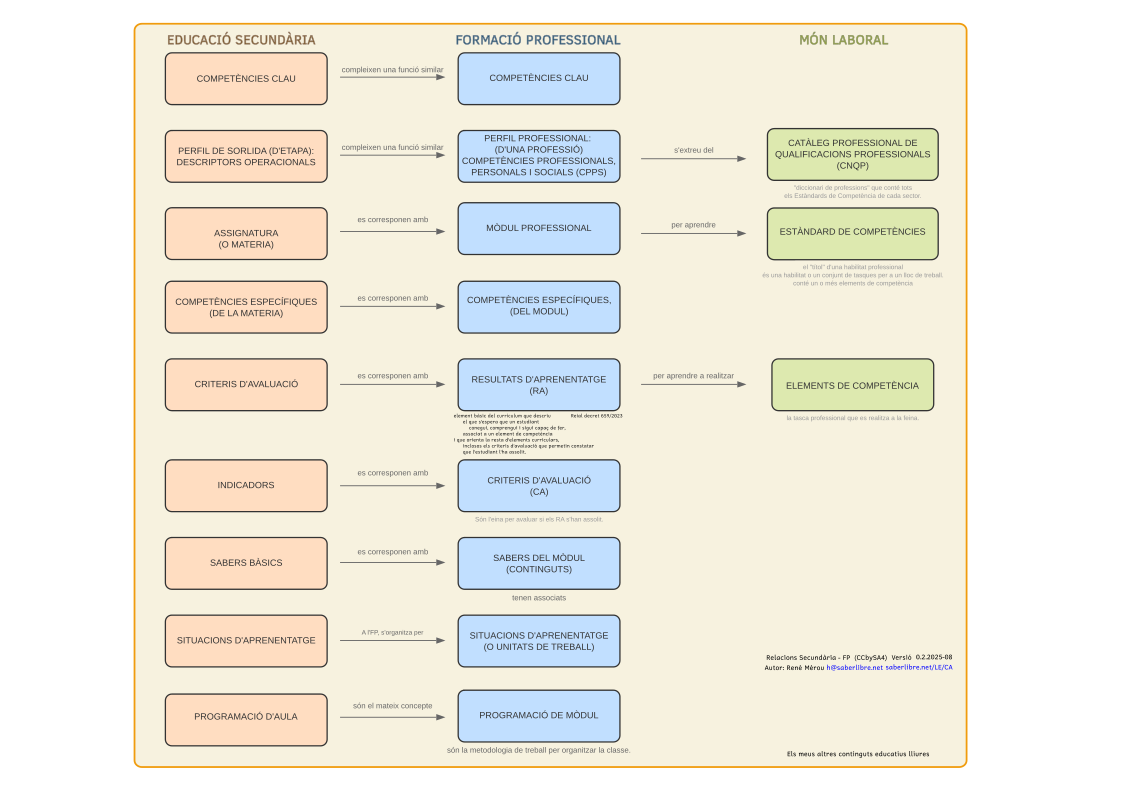
Key Competences
CCL: Competence in linguistic communication
It is the ability to express and interpret concepts, facts and opinions orally and in writing, interacting linguistically in all social and cultural contexts.
CP: Multilingual competence
It involves using different languages appropriately and effectively for learning and communication, taking advantage of one's own experiences to make transfers between them.
STEM: Mathematical competence and in science, technology and engineering
It is the ability to apply mathematical reasoning and the methods of science and technology to solve problems in diverse real-life contexts.
CD: Digital competence
It involves the safe, critical and creative use of information and communication technologies for learning, work and participation in society.
CPSAA: Personal, social and learning to learn competence
It is the ability to reflect on oneself, manage one's own learning, collaborate with others constructively and deal with uncertainty.
CC: Citizen competence
It is the ability to act as responsible citizens and participate fully in civic and social life, based on democratic values.
CE: Entrepreneurial competence
It is the ability to transform ideas into action, including creativity, innovation and the ability to plan and manage projects to achieve goals.
CCEC: Competence in cultural awareness and expression
It involves appreciating the importance of the creative expression of ideas, experiences and emotions through various media and artistic manifestations.
Operational Descriptors
CC3: Democratic coexistence
He reflects on ethical issues and human rights and participates in community activities, while becoming aware of the importance of citizen participation, cooperation, social cohesion and respect for diversity for democratic coexistence.
Justification for Inclusion
Its inclusion is justified by the growing interest in democratic participation and in the computational tools available connecting civic thinking with computational logic.
CCL1: Comprehension and analysis of texts
Comprehends, interprets and critically analyzes oral, signed and written texts of different types, form and support, evaluating their reliability, form and content, in order to build knowledge, form their own opinion and participate in social and cultural life.
CCEC4-1: Creation of artistic projects
Creatively selects and integrates various media and supports, as well as plastic, visual, audiovisual, sound or body techniques, to design and produce sustainable artistic and cultural projects.
Justification for Inclusion
This descriptor is key with the advent of generative AI. It is included to assess the ability to create a range of content (documentation, concept maps, icons, manuals) using these new tools effectively and creatively.
CD1: Information search and management
Performs efficient and secure information searches in different digital environments, selecting, evaluating, organizing and storing information and data in a critical and responsible manner to transform them into knowledge.
CD2: Communication and digital collaboration
Communicates, relates and collaborates effectively, safely and responsibly in environments and with digital tools, participating in collective activities and projects and contributing to the achievement of shared objectives.
CD3: Creation of digital content
It creates, edits, integrates and reworks complex digital content in different formats to express ideas, knowledge and opinions, and to disseminate its artistic and cultural production, respecting intellectual property and copyright.
CD4: Safe and responsible use
Identifies risks and takes preventive measures in using digital technologies to protect devices, personal data, health and the environment, and to become aware of the importance and need to make critical, legal, safe, healthy and sustainable use of these technologies.
CD5: Solving technical problems
Set up and use digital devices and tools, and solve simple technical problems, to take advantage of the opportunities offered by digital technology in lifelong learning and everyday life.
CE1: Analysis of challenges and opportunities
Analyzes and assesses challenges and opportunities in the immediate and global environment, and presents innovative and sustainable ideas and solutions, applying the principles of project management and design thinking, to create value for others.
CE2: Mobilization of resources
It mobilizes personal, social and cultural resources, including financial ones, to carry out ideas and projects, and to make ethical and responsible economic and financial decisions, considering the social and environmental impact.
Justification for Inclusion
Although not a direct descriptor of the subject, its inclusion is justified because data processing (Saber C) and project management (Saber B) often involve analyzing challenges and making informed decisions based on the feasibility and value that a software project can bring.
CP2: Communication in a foreign language
Uses fluently, appropriately and with acceptable correction one or more languages, in addition to the family language or languages, to respond to their communicative needs with spontaneity and autonomy in different situations and contexts in the personal, social, educational and professional spheres.
Justification for Inclusion
Although the curriculum does not explicitly link this descriptor to a specific competence in this subject, its inclusion is considered fundamental. The vast majority of technical documentation, forums, and programming learning resources are in English. Developing autonomy in the use of a foreign language is a key factor for the real progress of students.
CPSAA1: Self-awareness and personal growth
Self-aware and promotes ongoing personal growth, managing time and information effectively, and adapting to change to deal with uncertainty and complexity.
CPSAA2: Adaptation and management of uncertainty
Adapts and manages uncertainty, learning from mistakes constructively, to face the situations and challenges that arise in everyday life.
CPSAA3: Collaboration and teamwork
Collaborates with others constructively, maintaining resilience, and manages lifelong learning, contributing to self and others' physical, mental and emotional well-being.
CPSAA4: Learning Management
Manage your own learning, identifying your strengths and weaknesses, setting goals and planning the actions needed to achieve them, and evaluating your progress and results.
CPSAA5: Future Oriented Living
Design and manage a future-oriented life project, considering your aspirations, values and interests, and making informed and responsible decisions for your personal, social and professional development.
STEM1: Reasoning and mathematical representation
Uses inductive and deductive methods of mathematical reasoning in known situations, and selects and uses different strategies to solve problems by critically analyzing the solutions and reformulating the procedure, if necessary.
STEM2: Use of scientific models
It develops and uses models based on scientific knowledge to analyze natural and social phenomena, and to predict their evolution, while considering their limitations and uncertainty.
STEM3: Design and conduct research
Design and carry out research, individually or in teams, applying the scientific method and computational thinking, to pose questions and hypotheses, and to test them through experimentation or observation.
STEM4: Data analysis and conclusions
Analyzes and interprets data, using mathematical and technological tools, to draw relevant conclusions, assess the reliability of sources, and communicate results clearly and rigorously.
STEM5: Health and sustainability
It takes scientifically based actions to promote physical, mental and social health, and to preserve the environment and living beings.
Specific Competences
CEsp1: Analysis and design of algorithms
Analyze problems in an abstract and computational way, identifying the necessary data and the processes that apply to them, in order to design algorithms and programs that solve them efficiently.
CEsp2: Project development and management
Develop software projects, individually or as a team, applying project management methodologies for planning, monitoring and presentation of the final product.
CEsp3: Use of data structures
Select and use the most appropriate data types and structures for information storage and processing, considering the efficiency and complexity of operations.
CEsp4: Information storage
Organize and store information persistently and efficiently, using database management systems and other data exchange formats to ensure its integrity and security.
CEsp5: Publication and documentation of applications
Elaborate the documentation of a computer application and design friendly and accessible interfaces to facilitate its use and maintenance, taking into account the user experience.
CEsp6: Application of IT concepts
Know and apply fundamental concepts from different branches of computer science, such as artificial intelligence or version control, for problem solving and project development.
Assessment Criteria
CA1.1: Design of algorithms
Design solutions to computer problems through algorithms, applying programming elements and techniques in a creative way, regardless of the programming language that will be used in its implementation.
CA1.2: Application programming
Program applications for different environments, using programming principles and adapting algorithms to a specific programming language.
CA1.3: Creation of efficient programs
Create computer programs taking into account their efficiency both in computational cost and in modularity, cohesion and coupling.
CA2.1: Analysis and planning
Analyze and plan the application development process based on the requirements established in the statement.
This criterion is based on the analysis of the problem and the user requirements, and the design of software with diagrams, which are explained in the second year of high school.
CA2.2: Continuous improvement
Apply continuous improvement strategies applicable to the stages of the project's life cycle.
This criterion is closely linked to agile programming methodologies (SCRUM, Kanban) and version control tools (git, GitHub), which come second.
CA2.3: Use of methodologies
Use or learn appropriate software engineering methodologies according to the characteristics of the product to be developed.
This criterion is extended to the second year because it is directly linked to the use of agile and TDD methodologies and they are given in the second year of high school.
CA3.1: Selection of data structures
Program applications by selecting the most convenient data types and structures depending on the context.
CA3.2: Implementation of data structures
Incorporate data structures that enable efficient programs, minimizing resource consumption and execution time.
CA4.1: Database design
Design databases that ensure the integrity and consistency of the data to respond to a given problem.
This criterion requires knowledge of the entity-relationship model and the theory of normalization and since this is marked as knowledge exclusive to the second year of high school, this criterion is predominantly second year.
CA4.2: Manipulation of databases
Perform basic database manipulation operations (creation, query, update and deletion).
CA4.3: Use of data repositories
Work with other data repositories performing appropriate operations to meet project requirements.
CA5.1: Interaction design
Apply interaction design techniques according to style guides.
CA5.2: Usability evaluation
Study whether the created programs are useful and usable for their objective audience, identifying the shortcomings and, as the case may be, applying improvements in usefulness and usability.
CA5.3: Generation of documentation
Generate the documentation necessary for the end user to understand the operation with the aim of providing a guide that helps him use the program or application in a simple, intuitive and satisfactory way.
CA6.1: Incorporation of concepts
Incorporate concepts from certain branches of computer science in the creation of programs and applications.
CA6.2: Application research
Investigate current applications to learn their inner workings.
CA6.3: Version control
Monitor project versions by using version control tools.
CA6.4: Critical use of AI
Use artificial intelligence tools to produce content (including document to research a topic), to program and to learn everything with a very critical sense.
CA6.5: Simulation of environments
Simulate environments with own and/or available software and develop games.
Term Schedule
145 total sessions (4/week)
There are more sessions scheduled than time available in the calendar for two fundamental reasons:
- Pedagogical flexibility: It allows going deeper into the topics that generate the most interest or need in the group, and having extra activities available in case they prove useful.
- Adaptation to AI: The programme is designed to be modified and to accommodate the paradigm shift that artificial intelligence is bringing about in the field of development.

UP1: How do we organize our learning?
Portfolio and self-assessment
(15 sessions -1,2,3Av.)
Creation of the portfolio of the past year, of the present year and operation of the course.
- What is the institute portfolio?
- Create the portfolio with the outstanding contents of the past year.
- Where are the assignments delivered?
- Maturing the self-evaluation of the results
- Measuring the Effects of Classroom Tactics (Hattie)
UP2: How can we learn with an intelligent assistant?
Generalized learning with AI
(10 sessions - 1,2,3Av.)
Critical use of Artificial Intelligence tools for learning.
- Using AI for personalized learning
- Study methods, improvement...
- Personalized learning
- Rules to make learning effective
- Self-Assessment & Assessment by AI
- Learning with AI (personalized learning, rules and assessment)
- AI-assisted production (documents, programming, songs...).
UP3: How do we think like a computer?
Design of Algorithms and Flow Diagrams
(15 sessions - 1.2Av.)
Assessment of computational thinking and the ability to design logical solutions before programming.
- Continuous work in the class notebook.
- Making diagrams with the application Dia or similar.
- Final assessment exam on algorithm design.
UP4: How do we translate ideas into code?
Programming Practices and Data Structures
(20 sessions - 1,2,3Av.)
Translation of algorithms to real code, selecting and implementing efficient data structures.
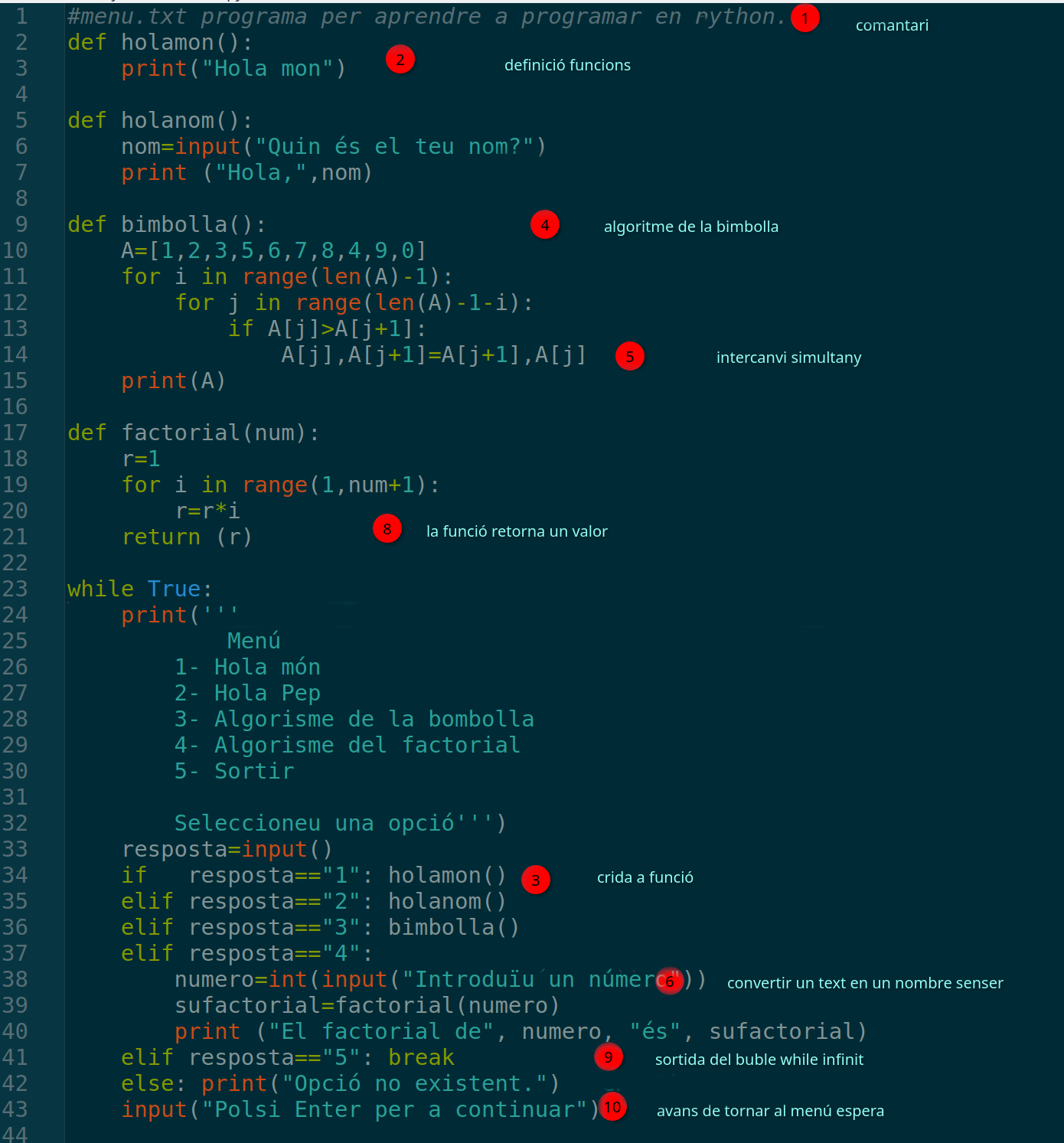
- Program applications by selecting data types and structures.
- Compare the efficiency between different structures for the same problem.
- Personalized learning with AI to reinforce concepts.
Checklist
UP5: How do we measure the efficiency of our code?
Work: Computational Cost Analysis
(5 sessions - 1 Av.)
Theoretical and practical analysis of the efficiency of the developed algorithms, learning to measure and optimize the consumption of resources.
- Calculation of the computational cost in exercises and exams.
UP6: How do we talk directly to the machine?
Introduction to the Linux Console
(6 sessions - 1.2Av.)
The console is used instrumentally during the course to achieve other goals. When the time comes, explicit time is devoted to the study of essential commands to solidify this knowledge and assess technical autonomy.
Evaluation methodology:
- Writing a list of commands in English explaining their usefulness, taking advantage to evaluate the multilingual competence (CP2).
- Solving paper sequences to validate the use of notes and the internalization of syntax (STEM4).
- Practical execution on the computer to demonstrate application of knowledge and autonomy in problem solving (CD5, CPSAA5).
UP7: How can we find the fairest winner?
Programming Project: Condorcet Winner
(5 sessions - 1,2,3Av.)
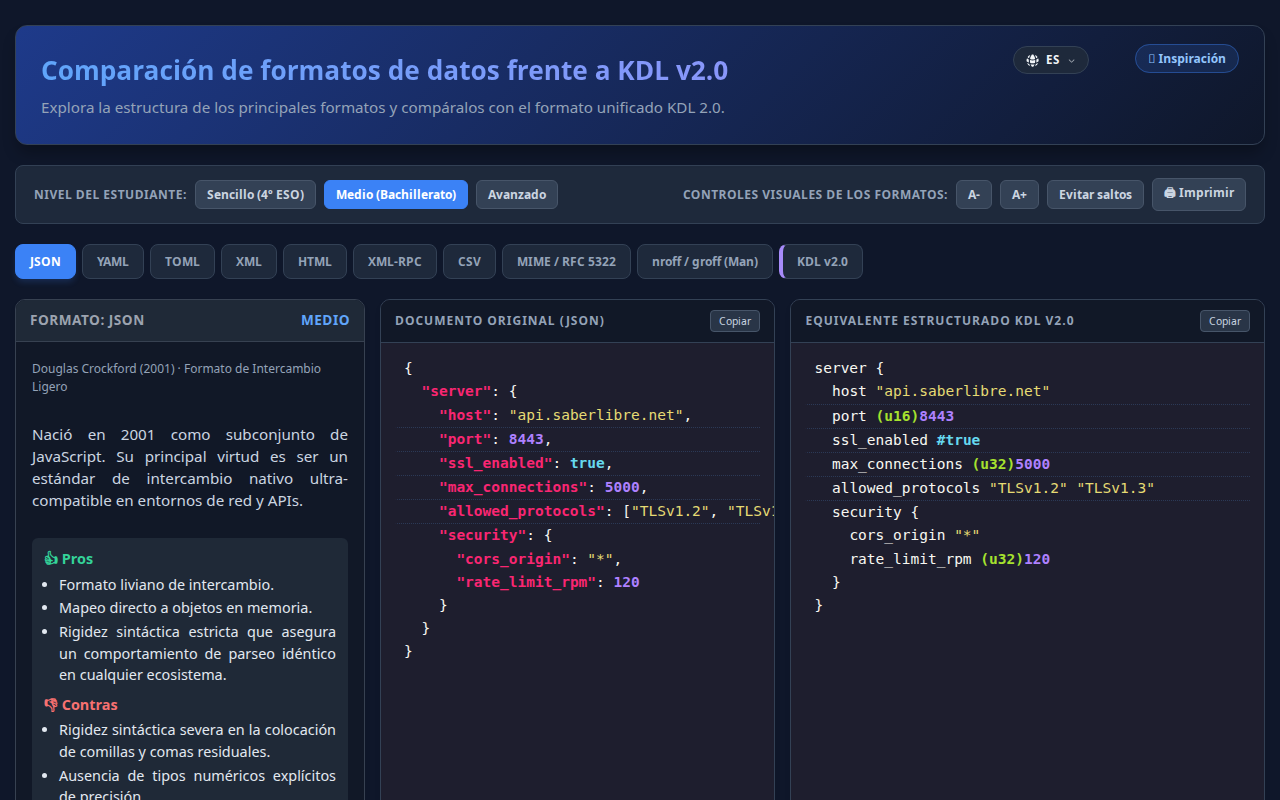
Development of a program that reads voting preferences from a JSON file and determines if a Condorcet winner exists.
UP8: What is the first step before building?
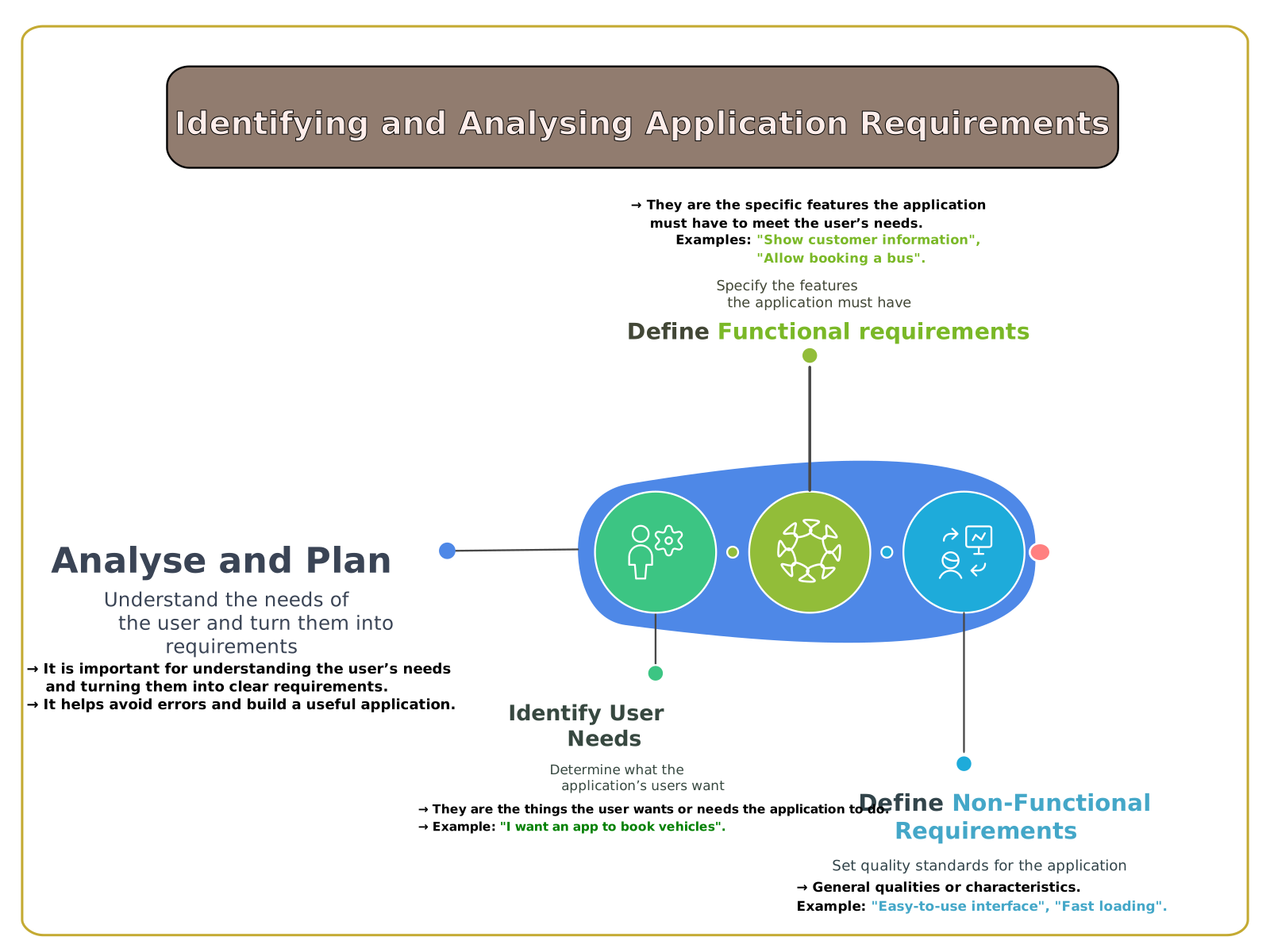
Introduction to Requirements Analysis
(3 sessions - 2 Av.)
Before starting the BBDD Project, let's learn to define what we really need to avoid future mistakes.
- Identification of real customer/user needs.
- Difference between Functional and Non-Functional Requirements.
- Advantages of analysis and planning before programming.
- Application of concepts to practical examples.
UP9: How do we manage large amounts of data?
Comprehensive Database Project
(25 sessions - 2.3Av.)
Complete project covering the data lifecycle from design to manipulation, import and presentation.
- Design and creation of DBDD and tables with office automation tools.
- Establishing primary keys and relationships.
- Creation of forms and subforms for data entry.
- Basic operations practices (CRUD): insert, query, update and delete.
- Import and export data to and from CSV or JSON files.
- Design and generation of reports for data visualization.
UP10: How do we make our programs useful?
Quality Practice: UX, Style and Documentation
(10 sessions - 3 Av.)
Improving the quality of software created, focusing on end-user experience and code maintainability.
- Application of programming style guides (eg Python PEP 8).
- Usability analysis to identify shortcomings and propose improvements.
- Generation of technical documentation and user manuals.
UP11: How do we work as a team without losing changes?
Practical Workshop: Version Control (Git)
(5 sessions - 3 Av.)
Introduction to professional version control tools for tracking and collaborating on software projects.
- Version tracking of a project using Git.
UP12: What else is there in the computer world?
Research Work: Branches of Computer Science
(10 sessions - 3 Av.)
Autonomous or AI-guided research into the fundamental concepts of other areas of computer science and current applications.
- Concepts of Networks, Operating Systems, etc.
- Analysis of the internal functioning of relevant applications.
UP13: How can we create virtual worlds and prototypes?
Simulation of real programming environments
(5 sessions - 1,2,3Av.)
Introduction that integrates programming and creation skills with the critical and efficient use of Artificial Intelligence tools.
- Simulation of environments with own or available software.
- Creation of prototypes (games, models...).
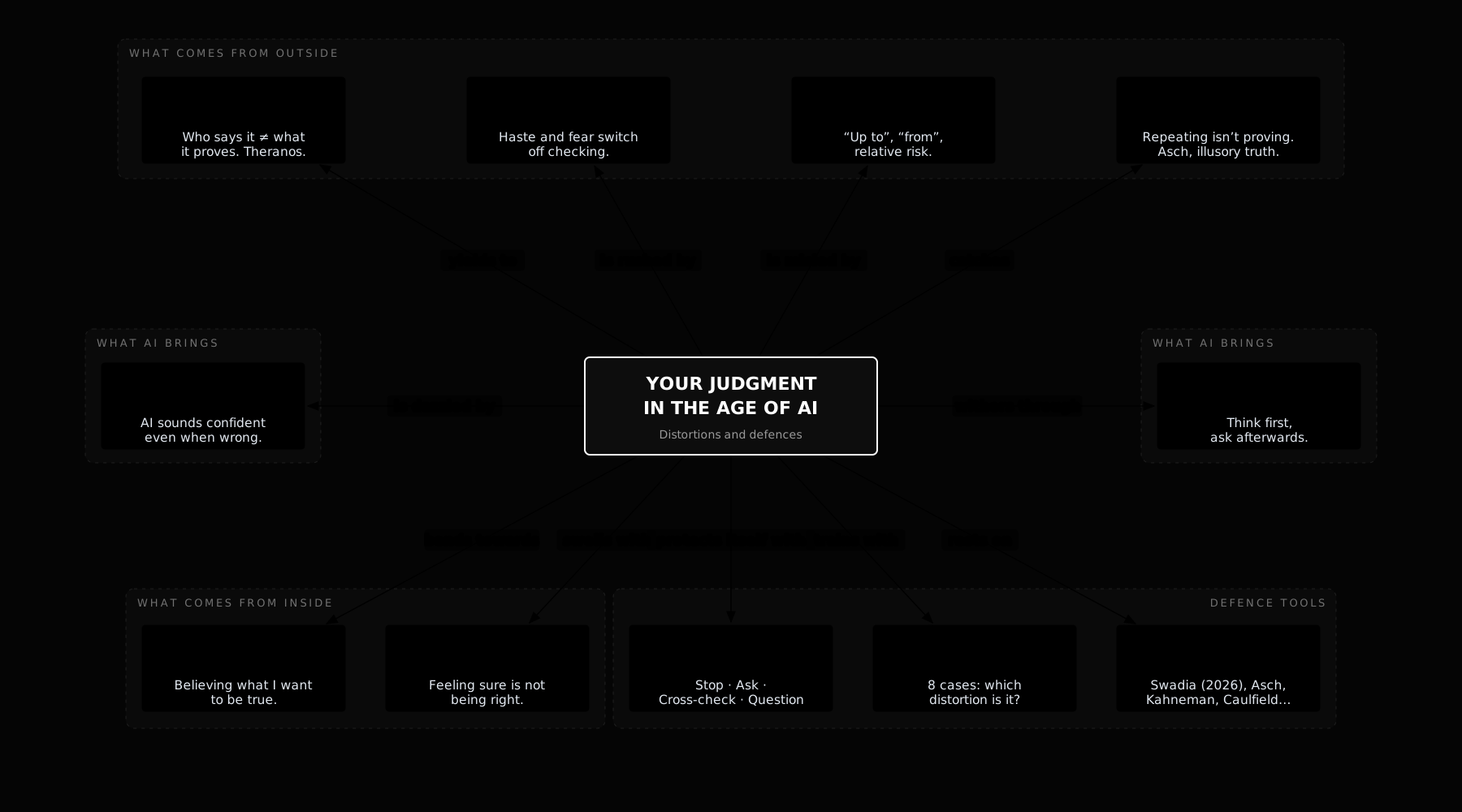
UP14: Your judgment in the age of AI
(6 sessions - 3 Av.)
Interactive concept map on the eight distortions that skew our judgment in the age of AI (authority, urgency, misleading numbers, repetition, fluency, cognitive offloading, motivated reasoning and overconfidence) and a four-step protocol to defend ourselves against them. It includes real cases, the key studies, prompts for checking AI answers and a test.
Basic Knowledge
A. ALGORITHM AND PROGRAMMING
- Computational thinking. algorithm
- Making algorithms. Pseudocode and flowcharts.
- Constants and variables. Basic operators.
- Logical, operational and relational operators.
- Solving problems using algorithms.
- Programming languages: definition and types.
- Integrated Development Environments (IDE).
- Coding and execution of programs.
- Control structures: Conditional and iterative.
- Integrated functions of the language.
B. PROJECT MANAGEMENT
- Life cycle and stages of a project.
- Software construction process: modularity.
- Resource and time management. Diagrams of Ghent and Pert.
- Traditional programming methodologies.
- Feedback of versions and changes.
C. DATA PROCESSING
- Basic data types, conversions and strings.
- Static data structures (Arrays).
- Entity-relationship model: diagrams, attributes and keys.
- Database Manager Systems (SGBD).
- SQL language: DDL (CREATE) and DML (UPDATE, INSERT).
- SQL queries: SELECT, filter and order.
- Storage formats: CSV, JSON.
- Management of text files (reading and writing).
D. PUBLICATION AND DOCUMENTATION
- Usability and user experience (UX).
- Input (keyboard) and output (screen) of information.
- Design of user-friendly terminal interfaces.
- Code: Comments and readability.
- Documentation of an application: structure and quality.
- User guide for the end user.
E. APPLICATION IN SIMULATED ENVIRONMENTS
Programming applications
- bat1
- artificial intelligence
- beat2
- robotics
- video games
- home automation
- cryptography
- massive data processing
- IoT
References and extras
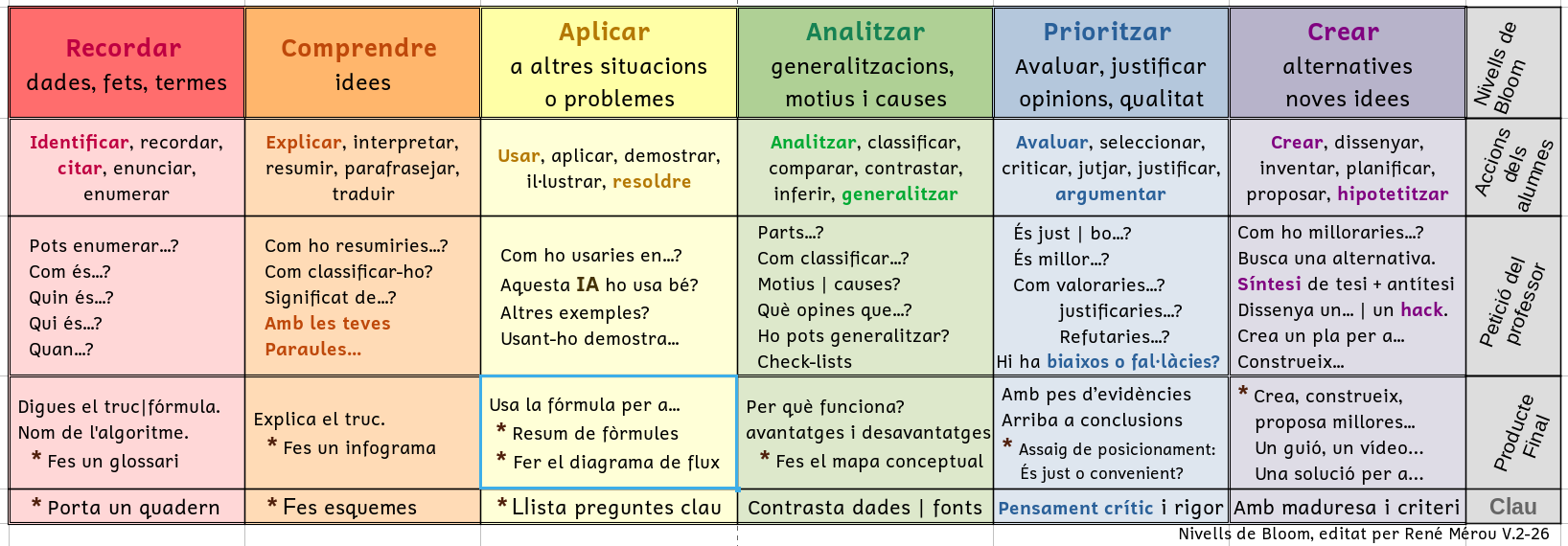
Bloom's Taxonomy Table
A visual guide to learn how to study better. Instead of just memorising, discover how to start by analysing and prioritising information to make your study more effective.
Useful for students and families to understand how we learn and how we are assessed.
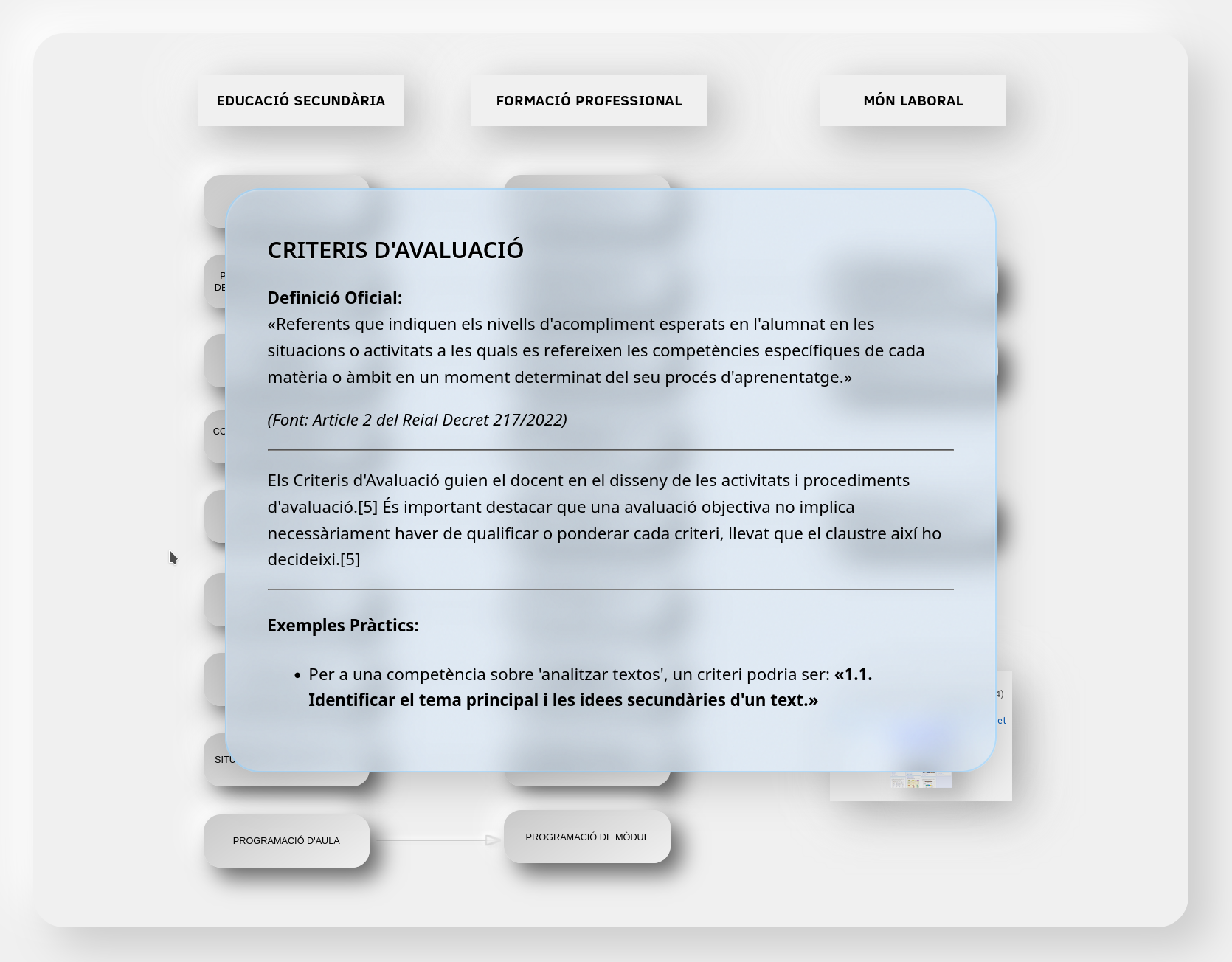
FP and Secondary Education Terminology
My interactive conceptual hypermap that clarifies and connects the terminology used in Vocational Training (FP) and Secondary Education.
Legal and Curricular Foundations
Legal foundations arranged chronologically (Official Pages):
- UNESCO (1996) - "Learning: The Treasure Within" report.
- OECD (1999) - Official portal of the DeSeCo Project.
- European Framework (2006) - Summary of the Key Competencies regulations.
- LOE (2006) - Consolidated text in the BOE.
- LOMCE (2013) - Consolidated text in the BOE.
- LOMLOE (2020) - Consolidated text in the BOE.
- RD 243/2022 - Exit Profile and Descriptors (Bachillerato).
- Balearic Islands - Decree 33/2022 - Curriculum reference page (CAIB).
- Balearic Islands - Decree 4/2023 - Page of the Organic Regulations (ROC).
- Balearic Islands - Decree 43/2025 - Visualization of the summary of BOIB 103/2025.