Key Competences
Competence in linguistic communication
It involves interacting coherently in different settings, whether orally, in writing or through multiple modes, mobilising knowledge to understand, interpret and produce messages critically and effectively.
Plurilingual competence
It involves using different languages appropriately and effectively for learning and communication, drawing on one's own experience to transfer knowledge between languages and to mediate between them.
Competence in mathematics and in science, technology and engineering
It involves using mathematical and scientific thinking to solve problems, together with technological and engineering methods to transform the environment responsibly and sustainably.
Digital competence
It involves the safe, healthy, sustainable, critical and responsible use of digital technologies for learning, work and social participation, including computational thinking and programming.
Personal, social and learning-to-learn competence
It is the ability to reflect on oneself, self-manage, collaborate with others, remain resilient and manage learning throughout life, coping with uncertainty and complexity.
Citizenship competence
It is the ability to exercise responsible citizenship and take part in social and civic life, based on an understanding of social, economic and political concepts and on a commitment to sustainability and human rights.
Entrepreneurial competence
It involves identifying needs and opportunities and turning ideas into solutions and projects that create value (social, cultural or economic), developing creativity, initiative and planning.
Competence in cultural awareness and expression
It involves understanding and respecting how ideas and emotions are expressed creatively in different cultures and art forms, and developing the expression of one's own ideas in a diverse world.
Operational Descriptors
CCL3
Produces oral, written and multimodal texts with different purposes and on different media, with accuracy, coherence and appropriateness, respecting textual properties and discourse conventions.
STEM1
Uses inductive and deductive methods typical of mathematical reasoning in familiar situations, and selects and applies different strategies to solve problems.
STEM2
Uses scientific thinking to understand and explain the phenomena around them, asking questions and seeking evidence-based answers.
STEM5
Puts healthy lifestyle habits into practice, becoming aware of the importance of health and sustainability for the preservation of the environment.
CD1
Performs advanced searches according to criteria of validity, quality, currency and reliability, selecting, organising and interpreting the information obtained to turn it into knowledge.
CD2
Manages their digital identity and interacts and communicates respectfully and competently on different platforms and social networks.
CD3
Creates, integrates and reworks digital content in different formats, respecting the intellectual property and copyright of the content they reuse.
CD4
Identifies risks and adopts preventive measures when using digital technologies to protect devices, personal data, health and the environment.
CD5
Develops simple software applications and creative, sustainable technological solutions to solve specific problems or respond to proposed challenges.
CPSAA1
Regulates and expresses their emotions, strengthening optimism and resilience to face challenges, and understands other people's emotions empathetically.
CPSAA2
Knows the health risks related to social factors and develops healthy lifestyle habits both physically and mentally.
CPSAA4
Carries out proposed activities proactively and perseveringly, accepting mistakes as part of the learning process and adapting to difficulties.
CPSAA5
Plans short- and medium-term goals, using self-assessment strategies to improve and persist in learning.
CC1
Analyses and understands the most relevant historical and social processes, identifying the connections between past, present and future, in order to exercise active, democratic citizenship.
CC2
Analyses the relationships between societies and their environment, and promotes responsible consumption habits and sustainable lifestyles.
CC3
Understands issues relating to justice, equality and global citizenship, and reflects on concepts such as democracy, human rights and sustainability.
CC4
Understands the intercultural dimension of societies, respecting diversity and promoting peaceful coexistence and conflict resolution.
CE1
Analyses needs and opportunities in their environment and puts forward innovative, sustainable and viable ideas and solutions, showing agility in decision-making.
CE3
Develops the personal qualities needed for entrepreneurship, such as creativity, perseverance, self-confidence and a critical spirit.
CP2
Understands and produces simple texts in a foreign language, seeking information and communicating on a basic level. Uses lexical repertoires and digital tools.
Justification for Inclusion
The vast majority of technical documentation, help forums and programming tutorials are in English. Fostering autonomy to consult these sources is key to students' real progress in the digital field.
CE2
Analyses basic elements of economics and finance and understands their impact on the world, society and the environment, in order to make decisions and guide projects.
Justification for Inclusion
Although it is not a direct descriptor of the subject, its inclusion is justified because knowledge areas such as e-commerce or digital payment methods require a basic understanding of online business models.
Specific Competences
1. Device and network management
Identify and solve simple technical problems, connect and configure devices on home networks, applying knowledge of hardware and operating systems to manage everyday computer and communication tools and installations.
2. Personal learning environment
Set up the personal learning environment by interacting with and making the most of digital resources to optimise and manage lifelong learning.
3. Digital wellbeing and safety
Develop habits that promote digital wellbeing, applying preventive and corrective measures to protect devices, personal data and one's own health.
4. Critical digital citizenship
Exercise critical digital citizenship and learn about the possible actions that can be taken online, identifying their potential consequences, in order to make active, responsible and ethical use of technology.
Assessment Criteria
Criterion 1.1
Assesses the reliability and quality of digital information sources, applying criteria of validity, currency and authorship for an advanced, selective information search.
Criterion 1.2
Uses open data repositories and applies strategies to organise and structure digital information, retrieving and referencing it with respect for intellectual property.
Criterion 1.3
Produces original, creative multimedia content (images, audio, video), using design and editing tools for communicative and artistic purposes.
Criterion 2.1
Uses synchronous and asynchronous communication tools effectively, applying netiquette and protocol rules for respectful, constructive interaction.
Criterion 2.2
Collaborates online in group projects, using collaborative work platforms for task management, project planning and solving collective problems.
Criterion 2.3
Manages digital identity and online reputation consciously and responsibly, applying cybersecurity measures to protect personal data and devices.
Criterion 3.1
Applies the phases of computational thinking to analyse, break down and abstract complex problems, designing logical and efficient algorithms.
Criterion 3.2
Implements simple software solutions using programming environments (block- or text-based), with control structures (conditionals, loops) and variables to solve practical problems.
Criterion 3.3
Evaluates and debugs errors in code, iterating the design and implementation process to improve the performance and functionality of the solution.
Criterion 4.1
Identifies the risks associated with the use of technology (addictions, cyberbullying, disinformation) and applies strategies to foster physical and mental wellbeing in the digital environment.
Criterion 4.2
Reflects critically on the impact of technology on society, content consumption and social media dynamics.
Criterion 4.3
Acts with ethical responsibility in the digital environment, respecting copyright and intellectual property, and contributing to environmental sustainability through conscious use of devices.
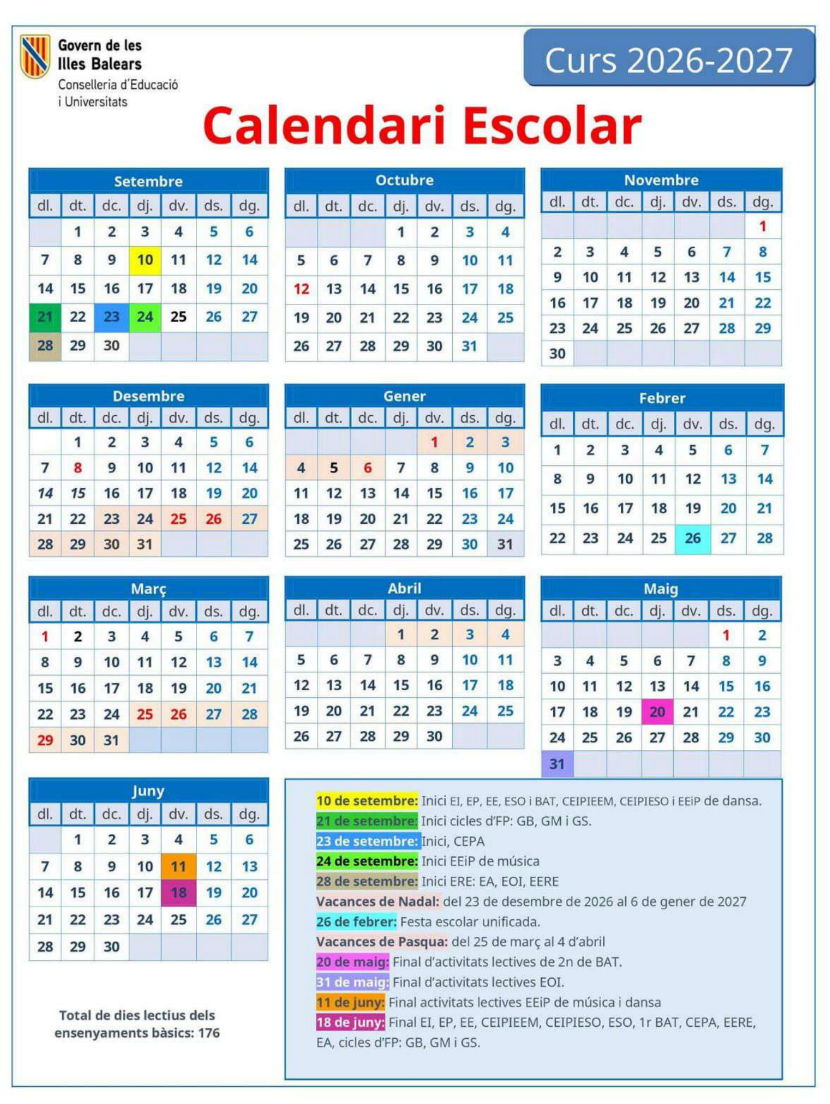
Term Schedule
104 sessions in total (3 per week)
There are more sessions scheduled than time available in the calendar for two fundamental reasons:
- Pedagogical flexibility: It allows going deeper into the topics that generate the most interest or need in the group, and having extra activities available in case they prove useful.
- Adaptation to AI: The programme is designed to be modified and to accommodate the paradigm shift that artificial intelligence is bringing about in the field of development.
UP1: Where do we start?
(15 initial sessions + continuous follow-up)
We welcome the group to the course by setting up our digital tools and building self-assessment skills through the Portfolio and an analysis of our characteristics as learners.
- Welcome, editing the Google Workspace profile (photo) and initial organisation of Classroom and Gmail.
- Presentation of the reflection on the effect of learning strategies (Hattie) and the use of checklists.
- What is the school portfolio? Creating it and first upload of relevant content from the previous course (photos, reflections...).
- Spreadsheets: we sort the "Student Skills", generate a chart and export it to PDF.
UP2: Typing (optional task to raise the grade)
(5-8 divided sessions. Optional: raises the grade by half a point if the previous course was not taught to most students)
We learn to type with all fingers without looking at the keyboard, improving speed and accuracy.
- Challenge 1: Learn to use all your fingers without looking at the keyboard.
- Challenge 2: Type each key with the corresponding finger.
- Challenge 3: Type fluently without mistakes.
- Challenge 4: Accuracy: keep the percentage of errors below 4%.
- Main platform: Cursomeca (cursomeca.com) with 27 guided lessons. Alternative in Catalan: MecaGratis (mecagratis.com).
- Other resources: TypingClub, Ratatype, Velocidactil, Artypist.
- Free applications for Linux: TuxTyping i KTouch.
Pedagogical justification
Touch typing develops muscle memory and hand-eye coordination, and facilitates note-taking, report creation and online exams. Despite the advancement of AI and speech recognition, typing quickly and without errors remains a core professional competency that frees up cognitive load for higher-level tasks.
UP3: Taking Technology Apart
(35 sessions)
We analyse the physical and logical components of a computer and learn to manage networks, operating systems and to solve technical problems.
- Final Product 1: Practical report on hardware components.
- Final Product 2: Assessment on software, free software and operating systems (with prior self-assessment).
- Final Product 3: Design and configuration of a simulated local network.
UP4: Citizens of Wikipedia
(20 sessions)
We develop critical thinking by searching for information in an advanced way and learn to collaborate in the largest free encyclopaedia in the world.
- Key Task: Practical search and source verification exercises to detect bias and fake news.
- Final Product: Research a topic and make a documented, justified contribution to Wikipedia.
UP5: The Digital Mirror
(25 sessions)
We investigate our own identity online, learning to manage our privacy and to protect ourselves from digital threats.
- Final Product 1: Summary report on one's own digital footprint and how to manage it.
- Final Product 2: Assessment on computer security, online threats and privacy settings.
- Practicals: Healthy ergonomics and keyboard use habits.
UP6: AI-Enhanced Creation
(30 sessions)
We explore the creative possibilities of Artificial Intelligence and reflect critically on the ethics and impact of these tools.
- Creative Workshop: Creating songs and images with generative AI tools.
- Key Task: Write a document by hand and then improve it with AI to compare results and learn to use it as a tool.
- Oral Assessment: Group debate on ethics and aesthetics online based on a video.
UP7: Programming Critical Thinking
(20 sessions)
We apply computational thinking to develop a small software application that, at the same time, makes us reflect on communication.
- Final Product: Developing a simulation program of a "sceptical chat" (with Python or a block-based environment) that responds to statements with questions.
- Practicals: Code debugging and error analysis.
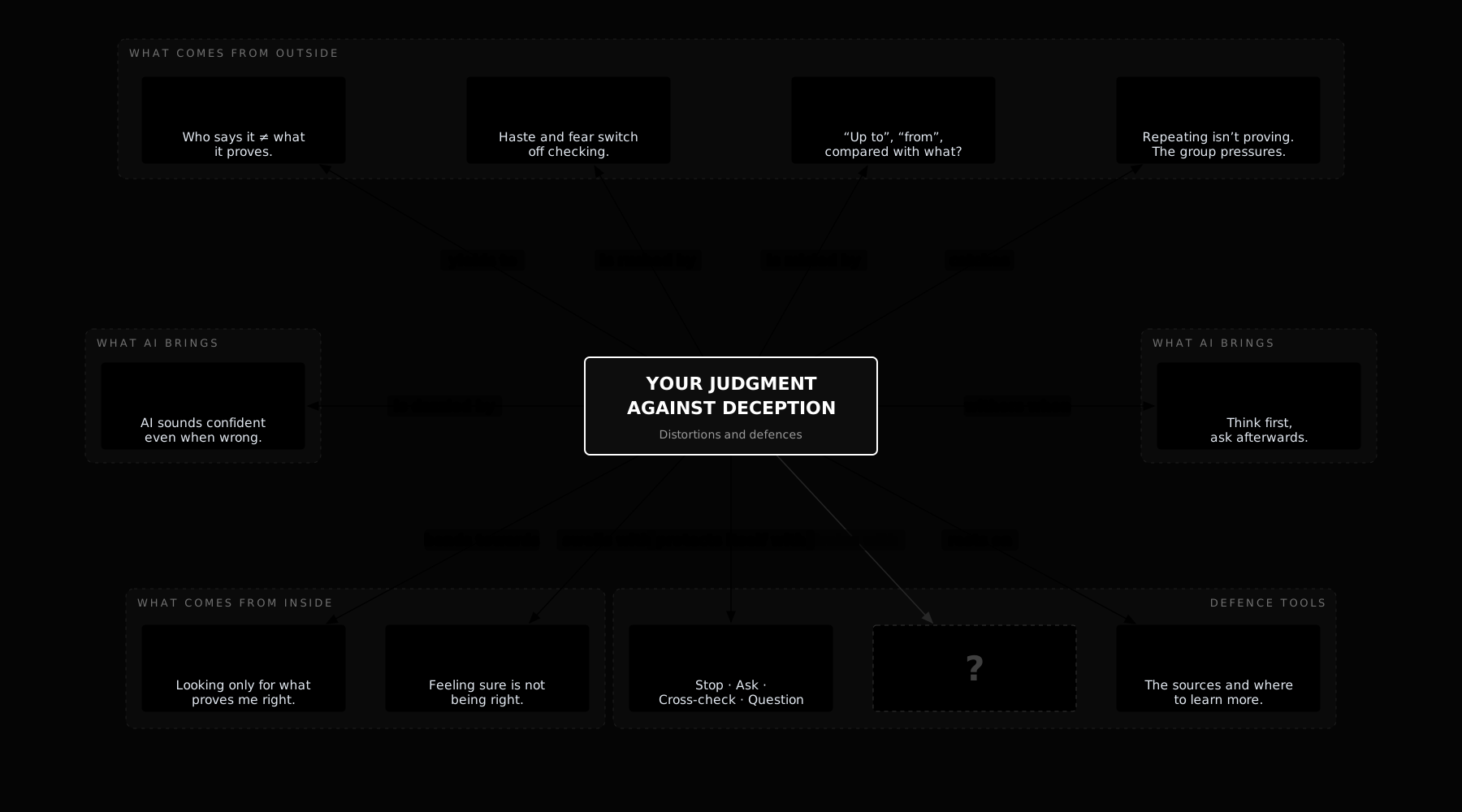
UP8: Your judgment against deception
(5 sessions)
Interactive concept map with the eight distortions that skew our judgment (authority, urgency, misleading numbers, repetition, AI fluency, delegation, confirmation bias and overconfidence) and a four-step protocol to defend ourselves against them. It includes real cases, warning signs, defence questions and a test.
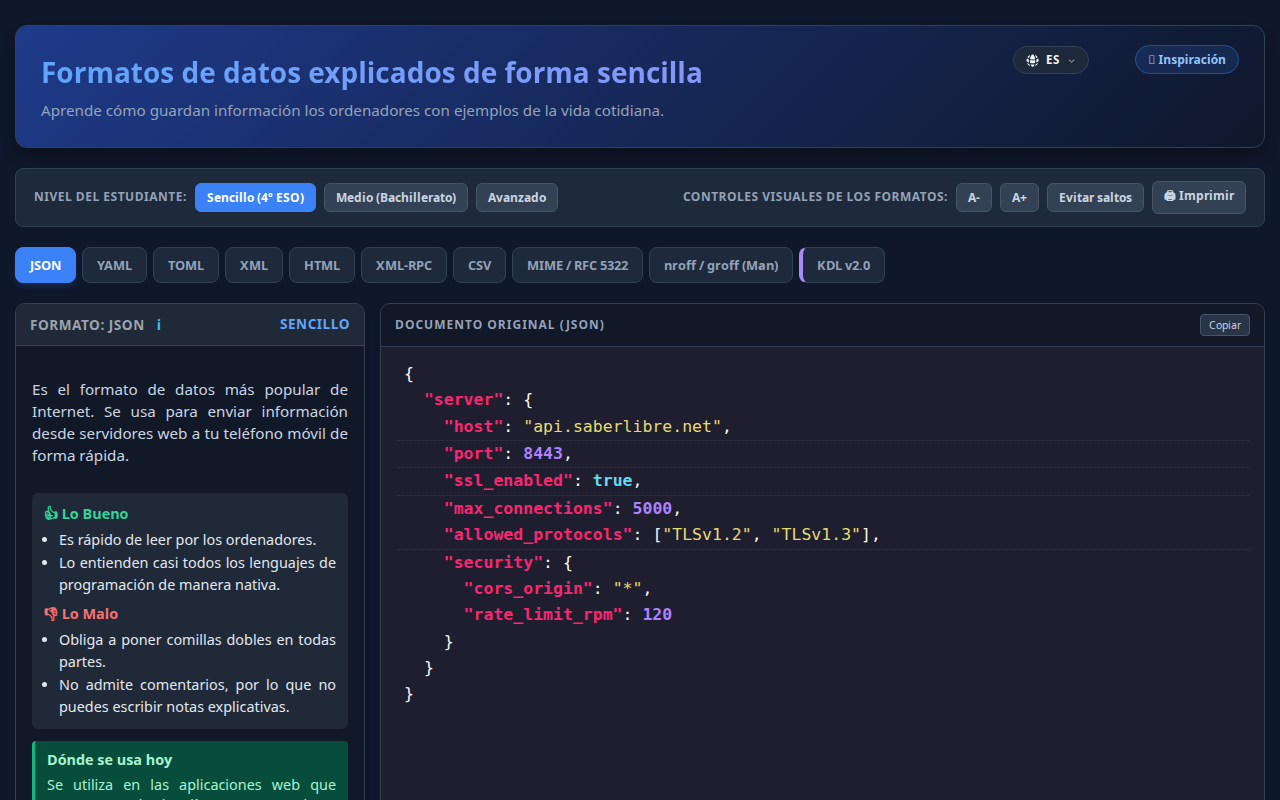
UP9: HTML, CSS and JSON: how a web page is built
(4 sessions)
The structure of a page with HTML, its look with CSS and its data organised in JSON. We will see how they relate to each other and how they can be read and edited with a text editor. We will also mention:
- Tags and the structure of an HTML document.
- Styles with CSS: colours, sizes and layout.
- Data in JSON: keys, values, lists and objects.
Basic Knowledge
A. Information, Data and Digital Content
- Advanced search and reliability criteria (source validation, authorship, date).
- Concepts of open data and data repositories.
- Digital information organisation systems.
- Editing images, audio and video to create multimedia content.
- Introduction to intellectual property, copyright and digital content licences.
B. Communication, Collaboration and Security
- Communication tools: managing email, instant messaging, video conferencing.
- Online collaboration tools: shared work environments, project management platforms.
- Managing digital identity and online reputation.
- Cybersecurity: strong passwords, two-factor authentication, privacy.
- Risk prevention: detecting phishing, malware and cyberbullying.
C. Computational Thinking and Programming
- Concepts of algorithm, abstraction and decomposition.
- Program structure: sequence, loops (repetition), conditionals (decisions).
- Use of variables and data structures.
- Developing small programming projects (games, simulations or apps) with visual or text-based environments.
- Debugging and analysing errors in code.
D. Digital Citizenship and Ethics
- Digital rights and duties: access to information, freedom of expression, data protection.
- Digital wellbeing: healthy habits, managing screen time and the risks of addiction.
- Digital footprint and its importance.
- Digital sustainability: energy consumption, device life cycle.
- Critical analysis of information: detecting fake news, stereotypes and manipulation.
References and extras
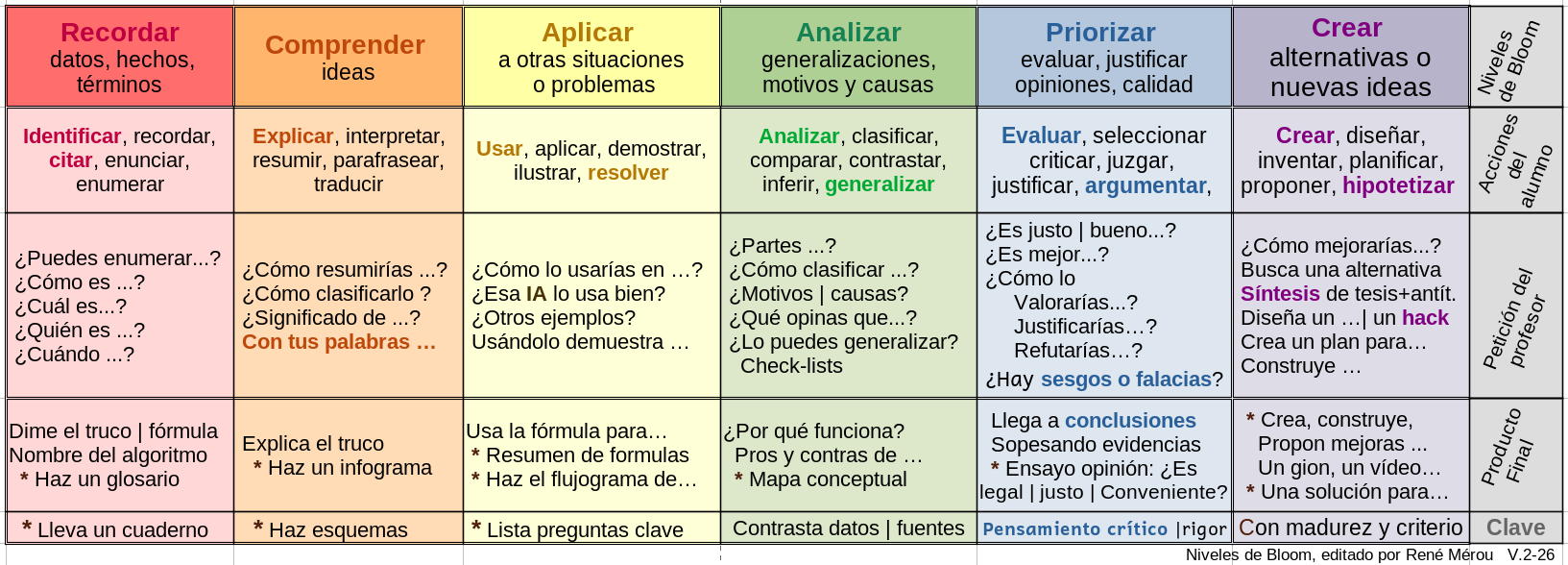
Bloom's Taxonomy Table
A visual guide to learn how to study better. Instead of just memorising, discover how to start by analysing and prioritising information to make your study more effective.
Useful for students and families to understand how we learn and how we are assessed.
Legal and Curricular Foundations
Legal foundations in chronological order:
- UNESCO (1996) - "Learning: The Treasure Within" report.
- OECD (1999) - Launches PISA and DeSeCo.
- European Reference Framework of Key Competences for Lifelong Learning (2006) - Adopted in 2006.
- LOE (2006) - Introduces basic competences.
- LOMCE (2013) - Key competences.
- LOMLOE (2020) - Amends the LOE and mandates criterion-based assessment.
- Balearic Islands - BOIB (2022) - Implements LOMLOE in 2022-23 (odd years).
- Balearic Islands - Decree (2023) - Organic Regulations.
- Balearic Islands - BOIB (2025) - Regulation and curriculum of compulsory secondary education (ESO).
FP and Secondary Education Terminology
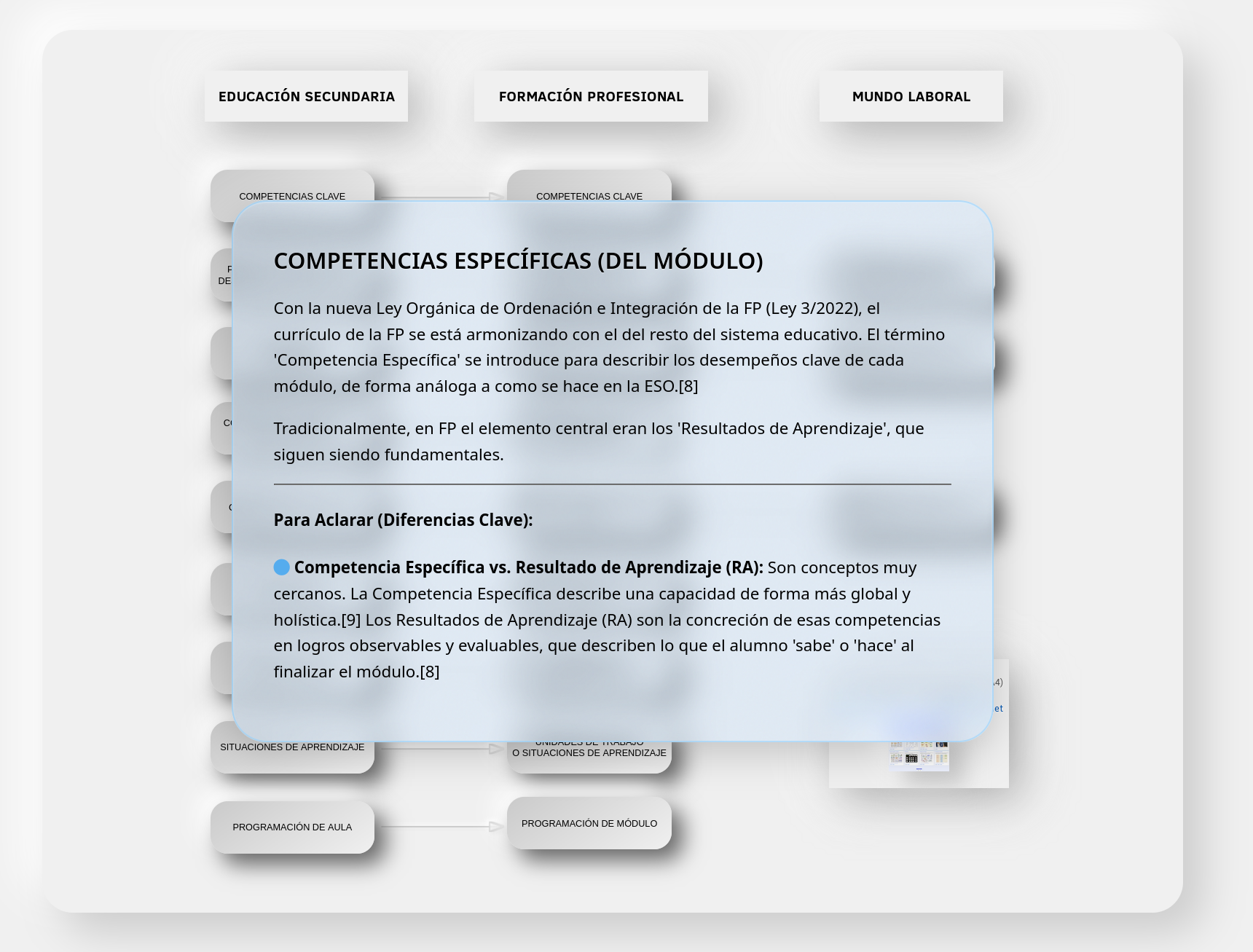
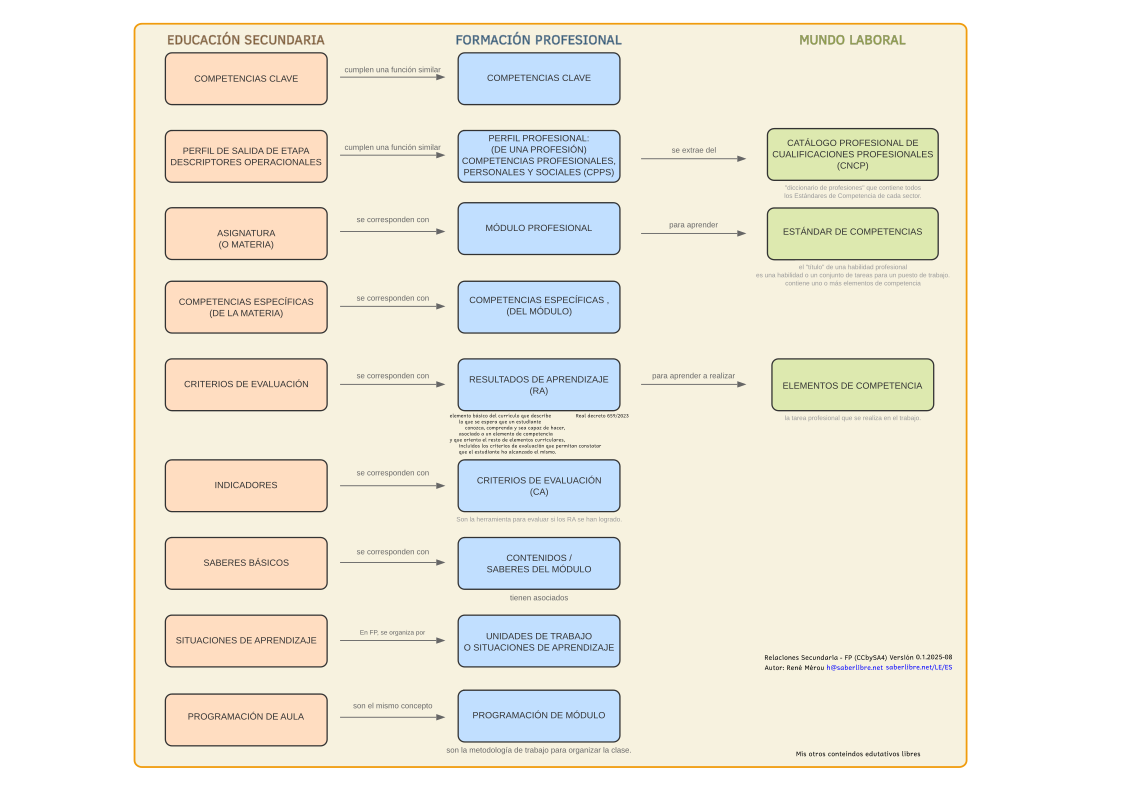
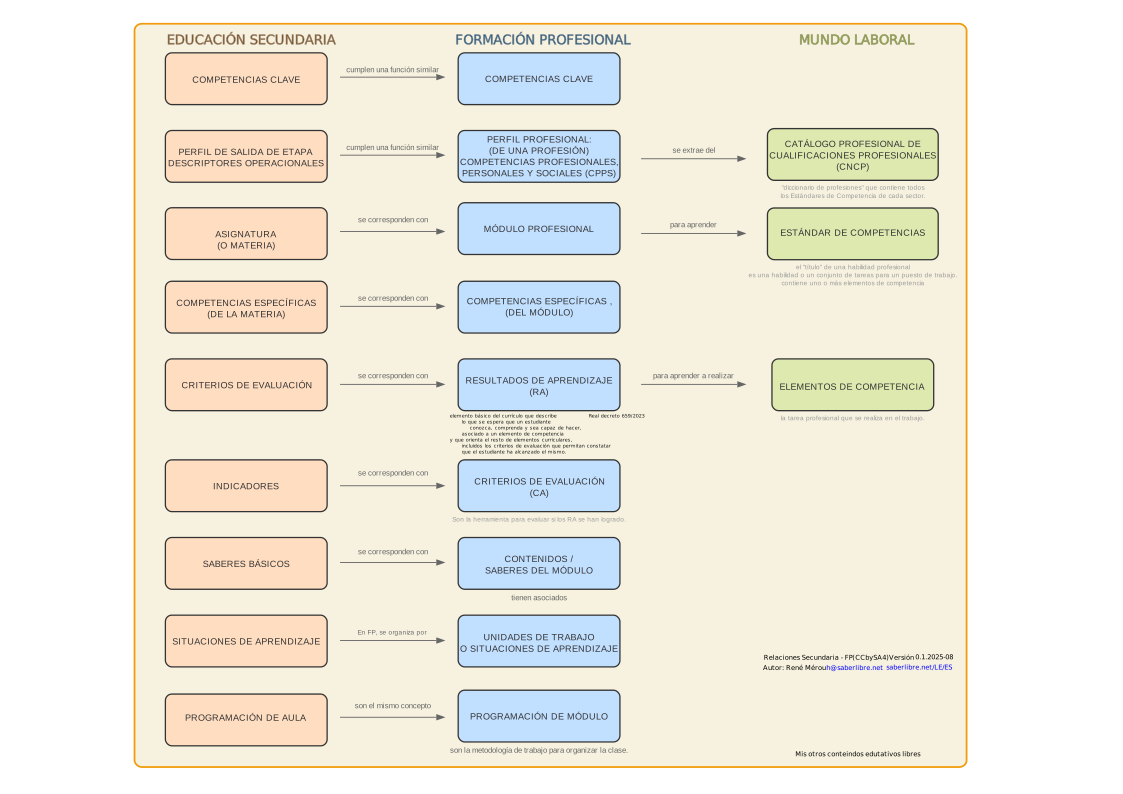
My interactive conceptual hypermap that clarifies and connects the terminology used in Vocational Training (FP) and Secondary Education.